ADAS Cockpit Design
Volkswagen Multimodal ADAS Cockpit Concept

Project Type
ADAS Cockpit Design
Timeline
Aug. 2022 - Dec. 2022
My Role
UX Designer
3D Visualization Manager
Tools
Figma
Adobe Illustrator
Adobe After Effects
Cinema 4D
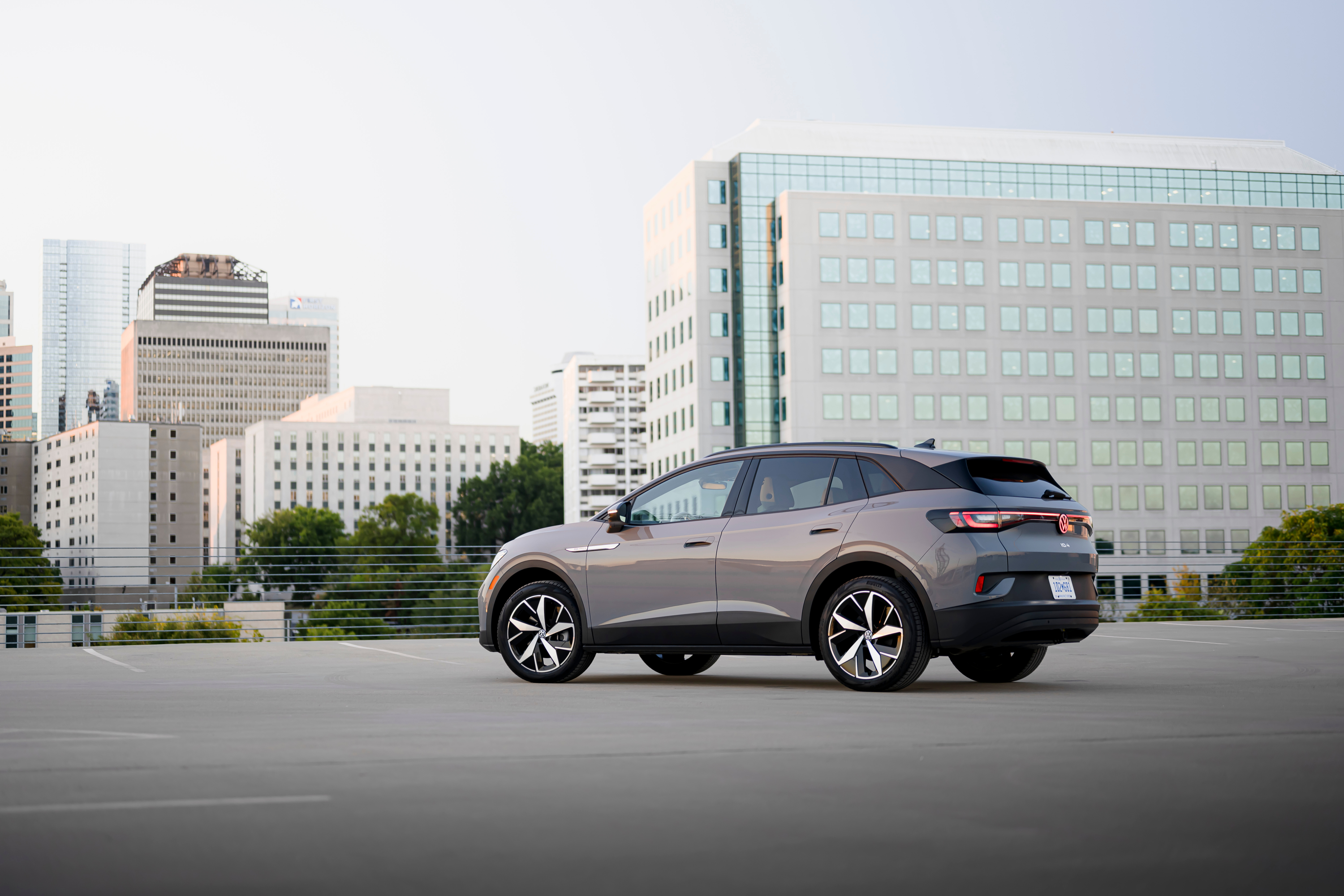
Volkswagen ADAS Concept Cockpit is an exploratory in-car interface concept built on an Android cockpit platform, showcasing next-generation advanced driver-assistance (ADAS) experiences through multimodal interaction. The project featured a cinematic 3D demo and an interactive AR-HUD system designed for autonomous and assisted driving scenarios.
As the lead UX designer, I was responsible for designing the AR-HUD interface, driving experience flows, and the coordination of multimodal outputs—visual (HUD & cluster), auditory (voice & ambient cues), and spatial (3D navigation + cockpit interaction). I also worked closely with external 3D production partners to shape a coherent and immersive narrative prototype.
Workflow - Prototyping ADAS Scenarios
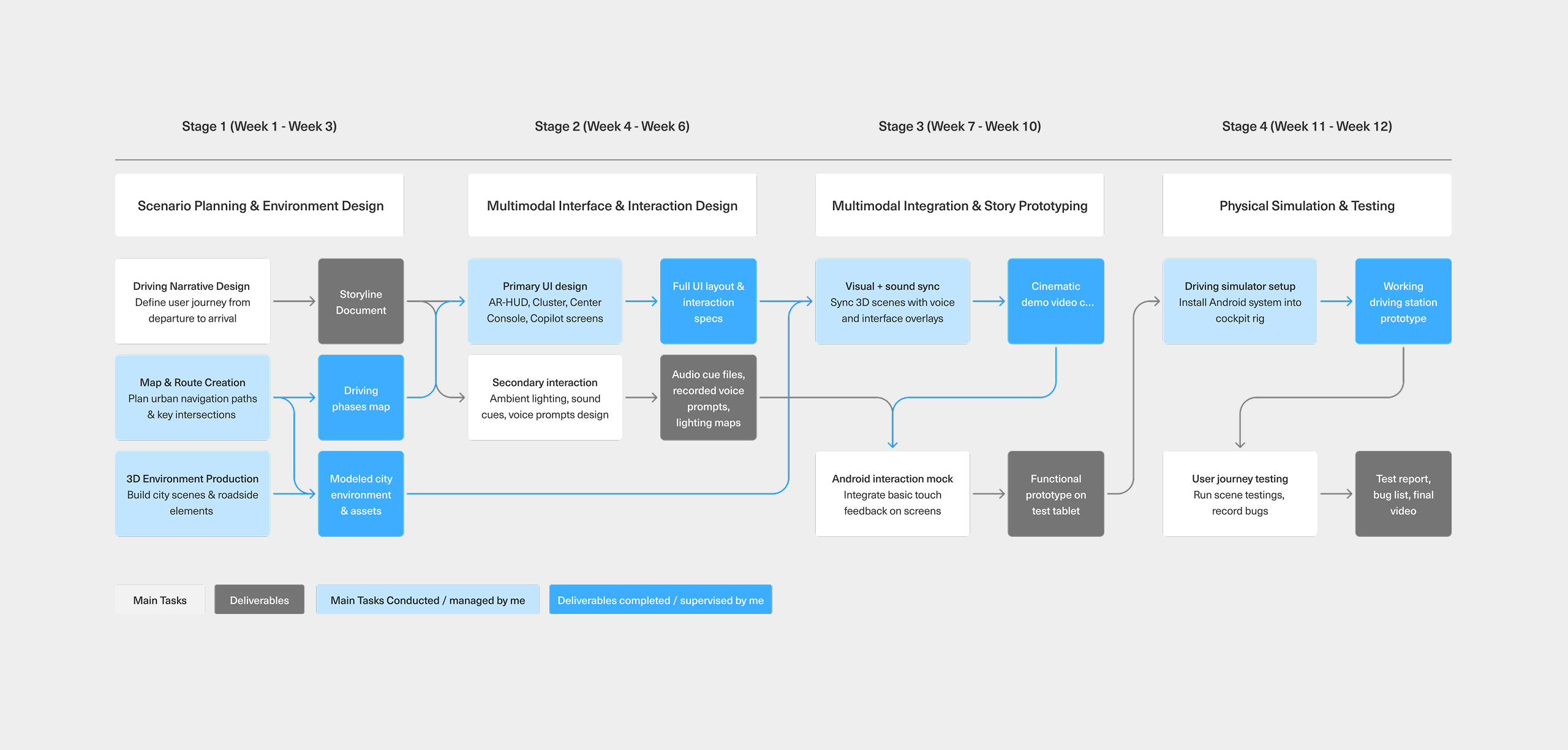
This diagram outlines the full design-to-deployment process of our HMI scenario prototyping.
Starting from user journey planning and multimodal UI design, we progressed through interface integration and voice-visual synchronization, culminating in a functional prototype deployed on both mock and HIL simulators.
Each stage highlights cross-functional collaboration between UX, visual, and engineering teams—ensuring a coherent, testable ADAS experience across modalities like AR-HUD, cluster, voice, and ambient lighting.
Driver-Centered Modalities for ADAS Experience
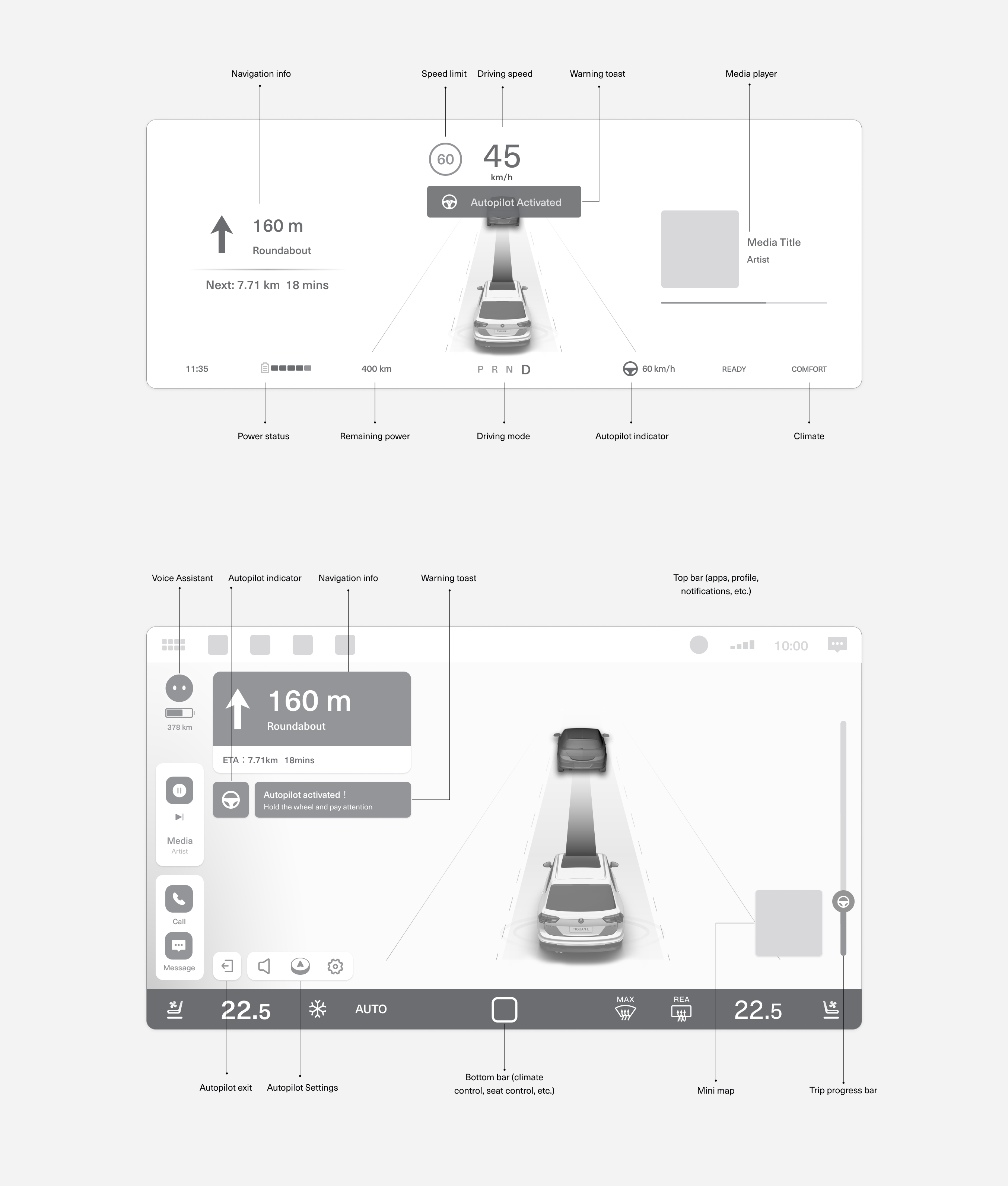
This low-fidelity wireframe represents an initial exploration of how key information—such as navigation, driving speed, and Autopilot status—might be distributed across the instrument cluster and central display. The cluster focuses on real-time, glanceable feedback for the driver, while the center display offers contextual information, system controls, and toast-style notifications.
At this stage, the goal was to experiment with spatial layout and modality roles rather than finalize visuals. It provided a foundation for thinking through how different types of content should be prioritized, how visual and voice prompts can work together, and how interface zones support driver awareness during AD engagement.
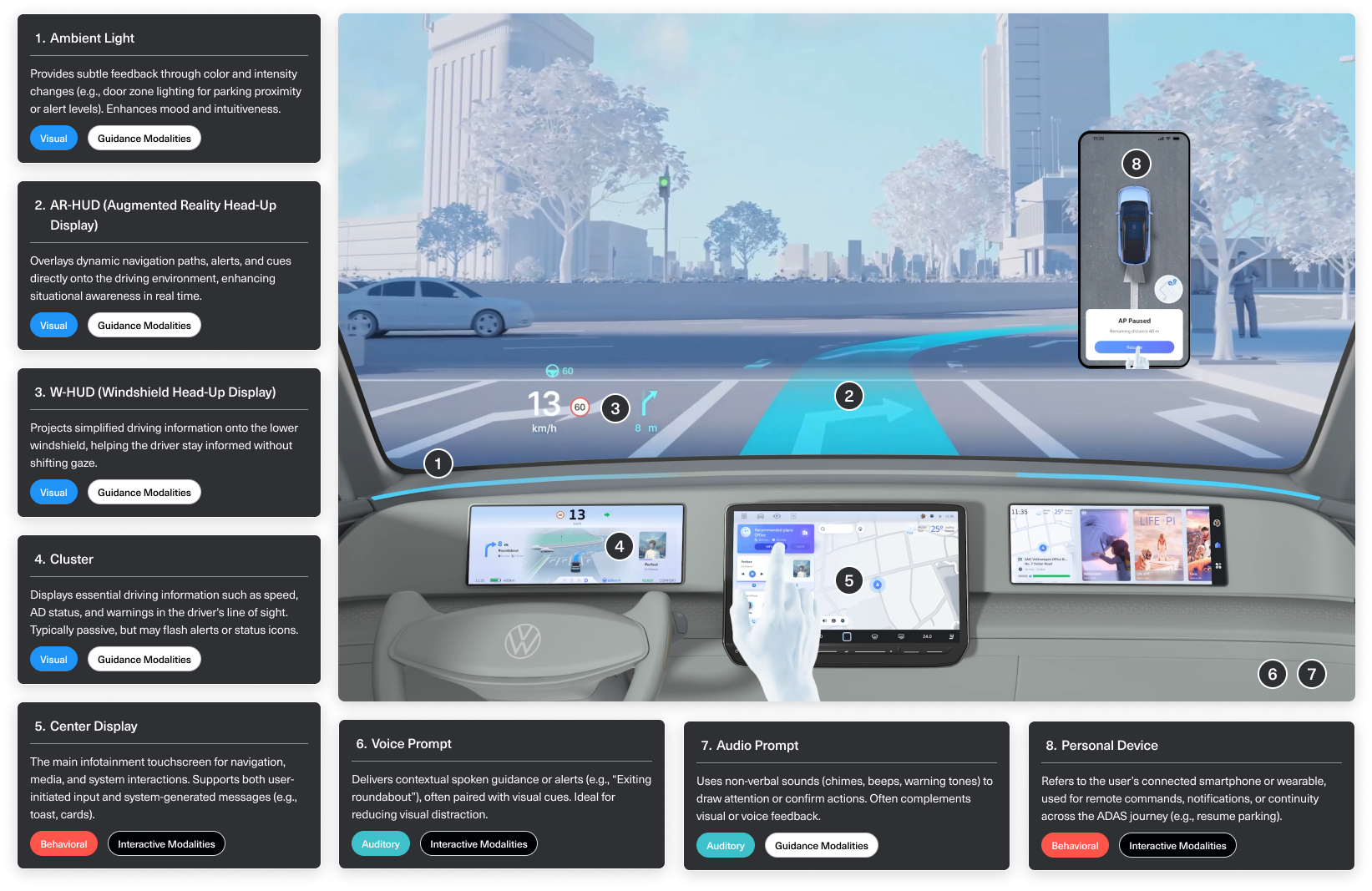
Multimodal Architecture of the Intelligent Cockpit
This diagram illustrates how key modalities are distributed across the cockpit to support different phases of the driving experience. It highlights how visual, auditory, and behavioral channels work together to deliver system status, navigation guidance, and user control.
Modalities are classified as either guidance (e.g. HUDs, ambient lighting, sound prompts) or interactive (e.g. center display, voice, personal device), and span across sensory types including visual, auditory, and behavioral. This structure ensures drivers receive the right information through the most appropriate channel.
Together, this cockpit-wide system supports a seamless, layered user experience across automated and manual driving modes.
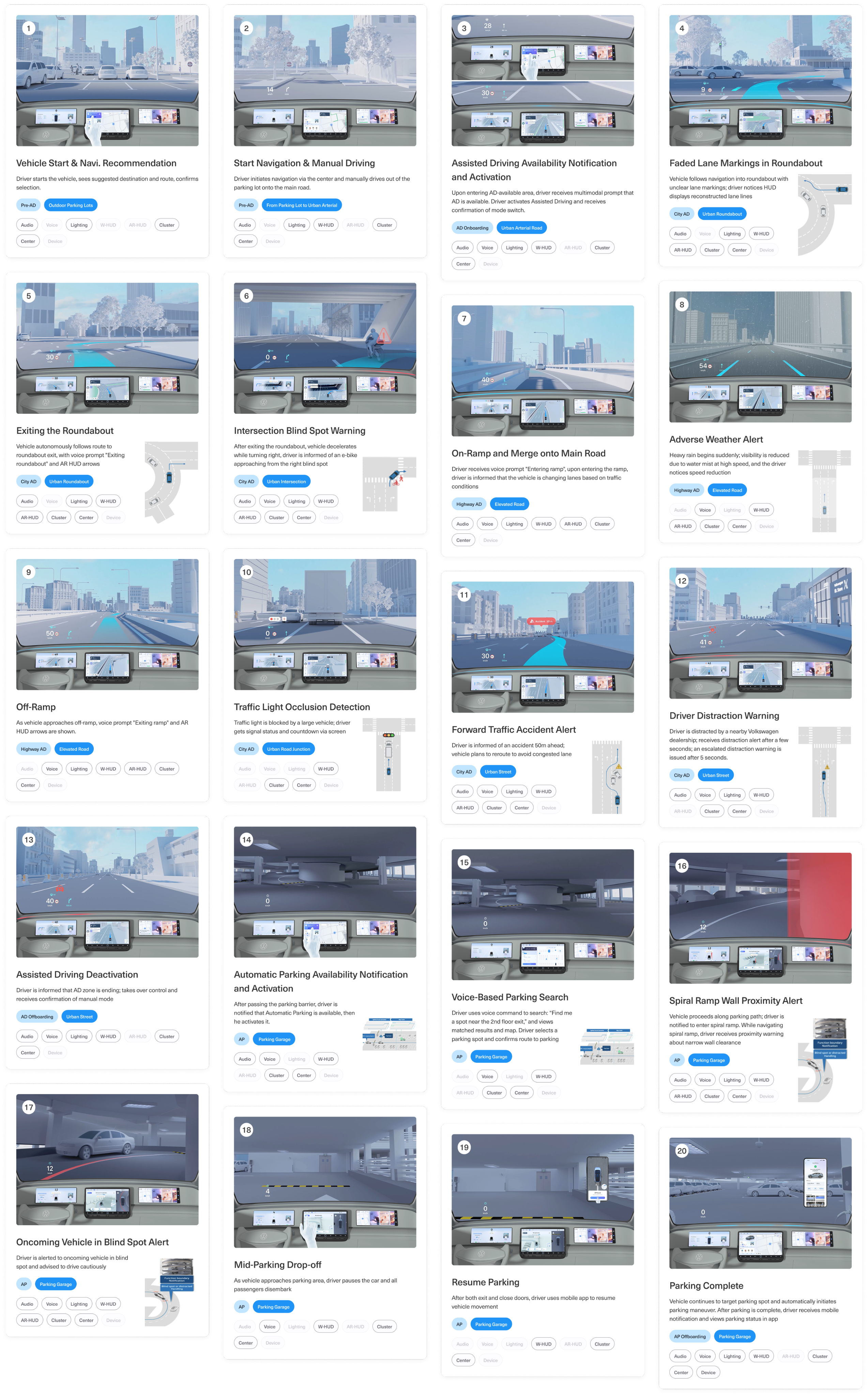
Multimodal ADAS Scenarios
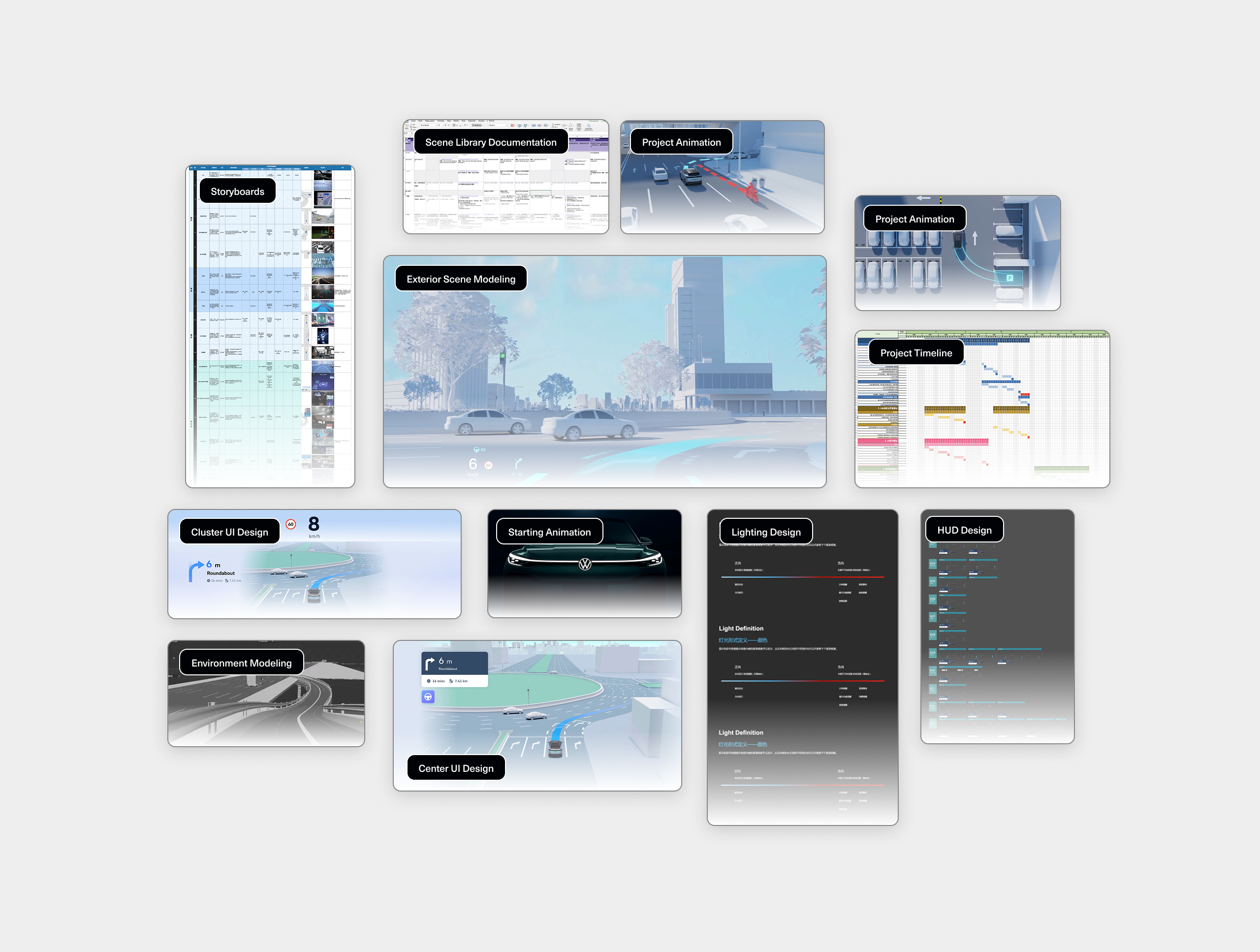
This cockpit prototype illustrates a continuous ADAS journey through 20 representative scenarios, covering a full cycle from vehicle startup, navigation, assisted driving engagement, to parking completion. Each scenario is triggered by a specific event—such as navigation updates, sensor detection, environmental conditions, or driver actions—and prompts the cockpit to respond through various multimodal outputs.
These outputs span across visual, auditory, and interactive modalities, including AR-HUD overlays, cluster alerts, ambient lighting cues, voice prompts, and screen-based interactions. The system dynamically selects and combines modalities based on context—balancing urgency, risk level, and driver attention—to ensure timely and intuitive communication.
Rather than examining individual scenes, this chapter highlights how multimodal orchestration supports a smooth, responsive, and safety-enhancing ADAS experience. It offers a structural blueprint for how cockpit systems can coordinate perception, decision, and guidance across varied driving conditions.
Progressive Evaluation in Simulated Cockpits
To ensure the reliability and experience consistency of multimodal ADAS interactions, we conducted extensive scenario testing in two distinct cockpit setups.
The first phase of validation took place in a simplified prototype simulator, enabling rapid iteration of UX logic, UI behavior, and modality coordination across various driving events. This environment allowed designers to quickly test triggers, interaction flows, and system responsiveness across over 20 driving scenarios—ranging from assisted driving handovers to edge cases like blind spot alerts and adverse weather warnings.
Upon completion of internal validation, the interaction prototypes were migrated to a high-fidelity simulator that emulates production-level vehicle hardware. This advanced setup was used for final tuning and presentation. The prototype was later showcased at the Volkswagen Innovation Fair, where stakeholders could experience the full end-to-end interaction flow in a realistic driving environment.
Prototype Simulator Testing
Initial interaction flows were validated in a lightweight cockpit simulator. This setup enabled rapid testing of multimodal UX logic and transitions across 20+ scenarios, helping the team identify key behavior patterns and modality coordination issues early on.
High-Fidelity Simulator Showcase
The final experience was ported to a high-fidelity cockpit with production-grade screens and controls. This environment allowed for realistic end-to-end validation and was used to demonstrate the design at the Volkswagen Innovation Fair.

ADAS Cockpit Design
Volkswagen Multimodal ADAS Cockpit Concept

Project Type
ADAS Cockpit Design
Timeline
Aug. 2022 - Dec. 2022
My Role
UX Designer
3D Visualization Manager
Tools
Figma
Adobe After Effects
Cinema 4D
Volkswagen ADAS Concept Cockpit is an exploratory in-car interface concept built on an Android cockpit platform, showcasing next-generation advanced driver-assistance (ADAS) experiences through multimodal interaction. The project featured a cinematic 3D demo and an interactive AR-HUD system designed for autonomous and assisted driving scenarios.
As the lead UX designer, I was responsible for designing the AR-HUD interface, driving experience flows, and the coordination of multimodal outputs—visual (HUD & cluster), auditory (voice & ambient cues), and spatial (3D navigation + cockpit interaction). I also worked closely with external 3D production partners to shape a coherent and immersive narrative prototype.
Workflow - Prototyping ADAS Scenarios
This diagram outlines the full design-to-deployment process of our HMI scenario prototyping.
Starting from user journey planning and multimodal UI design, we progressed through interface integration and voice-visual synchronization, culminating in a functional prototype deployed on both mock and HIL simulators.
Each stage highlights cross-functional collaboration between UX, visual, and engineering teams—ensuring a coherent, testable ADAS experience across modalities like AR-HUD, cluster, voice, and ambient lighting.
Driver-Centered Modalities for ADAS Experience
This low-fidelity wireframe represents an initial exploration of how key information—such as navigation, driving speed, and Autopilot status—might be distributed across the instrument cluster and central display. The cluster focuses on real-time, glanceable feedback for the driver, while the center display offers contextual information, system controls, and toast-style notifications.
At this stage, the goal was to experiment with spatial layout and modality roles rather than finalize visuals. It provided a foundation for thinking through how different types of content should be prioritized, how visual and voice prompts can work together, and how interface zones support driver awareness during AD engagement.
Multimodal Architecture of the Intelligent Cockpit
This diagram illustrates how key modalities are distributed across the cockpit to support different phases of the driving experience. It highlights how visual, auditory, and behavioral channels work together to deliver system status, navigation guidance, and user control.
Modalities are classified as either guidance (e.g. HUDs, ambient lighting, sound prompts) or interactive (e.g. center display, voice, personal device), and span across sensory types including visual, auditory, and behavioral. This structure ensures drivers receive the right information through the most appropriate channel.
Together, this cockpit-wide system supports a seamless, layered user experience across automated and manual driving modes.
Multimodal ADAS Scenarios
This cockpit prototype illustrates a continuous ADAS journey through 20 representative scenarios, covering a full cycle from vehicle startup, navigation, assisted driving engagement, to parking completion. Each scenario is triggered by a specific event—such as navigation updates, sensor detection, environmental conditions, or driver actions—and prompts the cockpit to respond through various multimodal outputs.
These outputs span across visual, auditory, and interactive modalities, including AR-HUD overlays, cluster alerts, ambient lighting cues, voice prompts, and screen-based interactions. The system dynamically selects and combines modalities based on context—balancing urgency, risk level, and driver attention—to ensure timely and intuitive communication.
Rather than examining individual scenes, this chapter highlights how multimodal orchestration supports a smooth, responsive, and safety-enhancing ADAS experience. It offers a structural blueprint for how cockpit systems can coordinate perception, decision, and guidance across varied driving conditions.
Progressive Evaluation in Simulated Cockpits
To ensure the reliability and experience consistency of multimodal ADAS interactions, we conducted extensive scenario testing in two distinct cockpit setups.
The first phase of validation took place in a simplified prototype simulator, enabling rapid iteration of UX logic, UI behavior, and modality coordination across various driving events. This environment allowed designers to quickly test triggers, interaction flows, and system responsiveness across over 20 driving scenarios—ranging from assisted driving handovers to edge cases like blind spot alerts and adverse weather warnings.
Upon completion of internal validation, the interaction prototypes were migrated to a high-fidelity simulator that emulates production-level vehicle hardware. This advanced setup was used for final tuning and presentation. The prototype was later showcased at the Volkswagen Innovation Fair, where stakeholders could experience the full end-to-end interaction flow in a realistic driving environment.
Prototype Simulator Testing
Initial interaction flows were validated in a lightweight cockpit simulator. This setup enabled rapid testing of multimodal UX logic and transitions across 20+ scenarios, helping the team identify key behavior patterns and modality coordination issues early on.
High-Fidelity Simulator Showcase
The final experience was ported to a high-fidelity cockpit with production-grade screens and controls. This environment allowed for realistic end-to-end validation and was used to demonstrate the design at the Volkswagen Innovation Fair.

ADAS Cockpit Design
Volkswagen Multimodal ADAS Cockpit Concept

Project Type
ADAS Cockpit Design
Timeline
Aug. 2022 - Dec. 2022
My Role
UX Designer
3D Visualization Manager
Tools
Figma
Adobe Illustrator
Adobe After Effects
Cinema 4D
Volkswagen ADAS Concept Cockpit is an exploratory in-car interface concept built on an Android cockpit platform, showcasing next-generation advanced driver-assistance (ADAS) experiences through multimodal interaction. The project featured a cinematic 3D demo and an interactive AR-HUD system designed for autonomous and assisted driving scenarios.
As the lead UX designer, I was responsible for designing the AR-HUD interface, driving experience flows, and the coordination of multimodal outputs—visual (HUD & cluster), auditory (voice & ambient cues), and spatial (3D navigation + cockpit interaction). I also worked closely with external 3D production partners to shape a coherent and immersive narrative prototype.
Workflow - Prototyping ADAS Scenarios
This diagram outlines the full design-to-deployment process of our HMI scenario prototyping.
Starting from user journey planning and multimodal UI design, we progressed through interface integration and voice-visual synchronization, culminating in a functional prototype deployed on both mock and HIL simulators.
Each stage highlights cross-functional collaboration between UX, visual, and engineering teams—ensuring a coherent, testable ADAS experience across modalities like AR-HUD, cluster, voice, and ambient lighting.
Driver-Centered Modalities for ADAS Experience
This low-fidelity wireframe represents an initial exploration of how key information—such as navigation, driving speed, and Autopilot status—might be distributed across the instrument cluster and central display. The cluster focuses on real-time, glanceable feedback for the driver, while the center display offers contextual information, system controls, and toast-style notifications.
At this stage, the goal was to experiment with spatial layout and modality roles rather than finalize visuals. It provided a foundation for thinking through how different types of content should be prioritized, how visual and voice prompts can work together, and how interface zones support driver awareness during AD engagement.
Multimodal Architecture of the Intelligent Cockpit
This diagram illustrates how key modalities are distributed across the cockpit to support different phases of the driving experience. It highlights how visual, auditory, and behavioral channels work together to deliver system status, navigation guidance, and user control.
Modalities are classified as either guidance (e.g. HUDs, ambient lighting, sound prompts) or interactive (e.g. center display, voice, personal device), and span across sensory types including visual, auditory, and behavioral. This structure ensures drivers receive the right information through the most appropriate channel.
Together, this cockpit-wide system supports a seamless, layered user experience across automated and manual driving modes.
Multimodal ADAS Scenarios
This cockpit prototype illustrates a continuous ADAS journey through 20 representative scenarios, covering a full cycle from vehicle startup, navigation, assisted driving engagement, to parking completion. Each scenario is triggered by a specific event—such as navigation updates, sensor detection, environmental conditions, or driver actions—and prompts the cockpit to respond through various multimodal outputs.
These outputs span across visual, auditory, and interactive modalities, including AR-HUD overlays, cluster alerts, ambient lighting cues, voice prompts, and screen-based interactions. The system dynamically selects and combines modalities based on context—balancing urgency, risk level, and driver attention—to ensure timely and intuitive communication.
Rather than examining individual scenes, this chapter highlights how multimodal orchestration supports a smooth, responsive, and safety-enhancing ADAS experience. It offers a structural blueprint for how cockpit systems can coordinate perception, decision, and guidance across varied driving conditions.
Progressive Evaluation in Simulated Cockpits
To ensure the reliability and experience consistency of multimodal ADAS interactions, we conducted extensive scenario testing in two distinct cockpit setups.
The first phase of validation took place in a simplified prototype simulator, enabling rapid iteration of UX logic, UI behavior, and modality coordination across various driving events. This environment allowed designers to quickly test triggers, interaction flows, and system responsiveness across over 20 driving scenarios—ranging from assisted driving handovers to edge cases like blind spot alerts and adverse weather warnings.
Upon completion of internal validation, the interaction prototypes were migrated to a high-fidelity simulator that emulates production-level vehicle hardware. This advanced setup was used for final tuning and presentation. The prototype was later showcased at the Volkswagen Innovation Fair, where stakeholders could experience the full end-to-end interaction flow in a realistic driving environment.
Prototype Simulator Testing
Initial interaction flows were validated in a lightweight cockpit simulator. This setup enabled rapid testing of multimodal UX logic and transitions across 20+ scenarios, helping the team identify key behavior patterns and modality coordination issues early on.
High-Fidelity Simulator Showcase
The final experience was ported to a high-fidelity cockpit with production-grade screens and controls. This environment allowed for realistic end-to-end validation and was used to demonstrate the design at the Volkswagen Innovation Fair.
