Porsche Internal Operation Console for App Push and SMS Message
Porsche Notification Center

Project Type
ToB Platform, Internal Tool
Timeline
June 2024 – December 2025
My Role
Product Designer
Tools
Figma
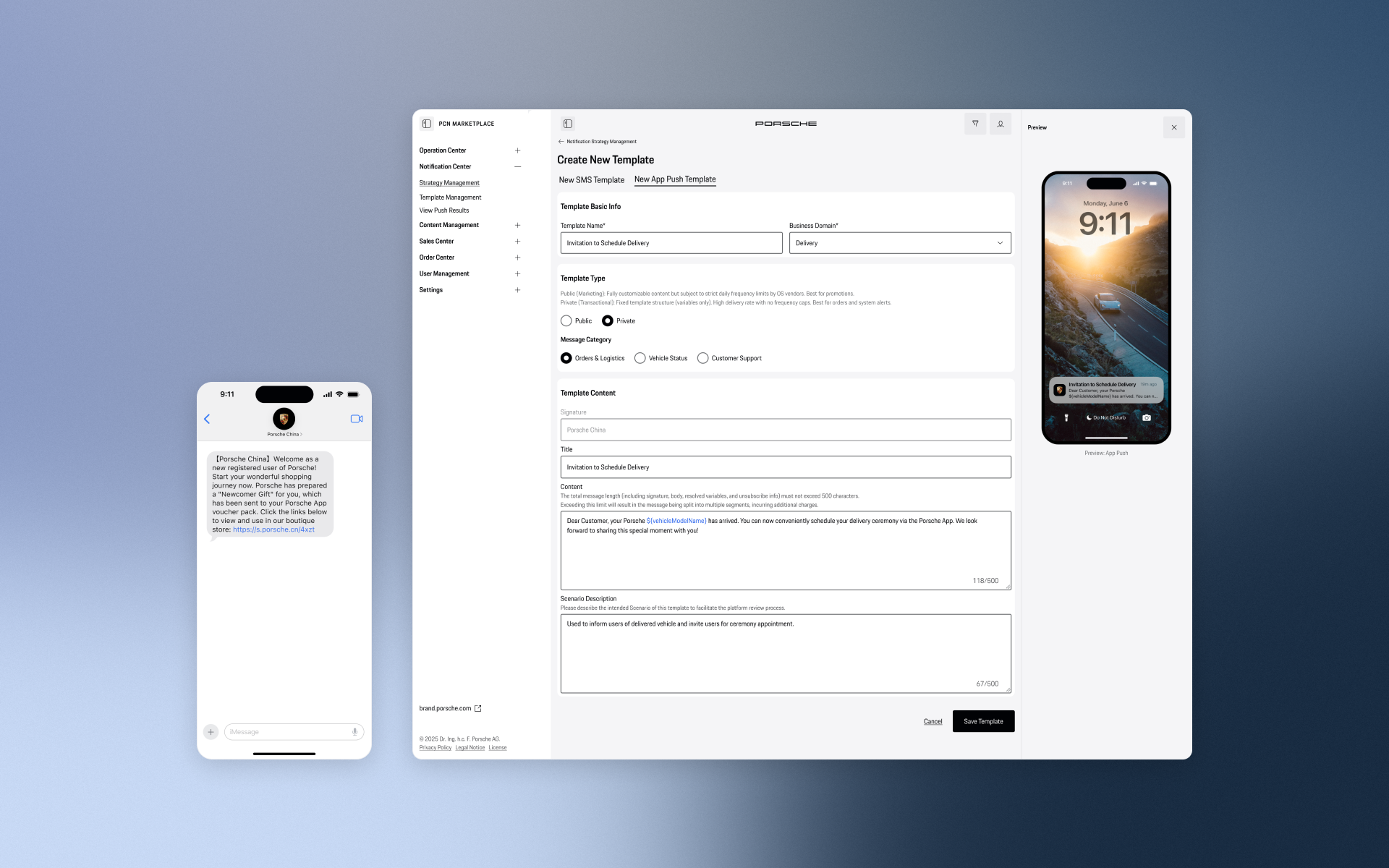
The Porsche Notification Center is a centralized B2B operation console designed for Porsche China. It transforms a highly fragmented, developer-dependent notification process into a streamlined, no-code omni-channel hub. By introducing a visual template editor and automated lifecycle strategies, the platform empowers the operations team to independently launch, manage, and track campaigns across SMS, App Push, and the WeChat ecosystem with zero coding errors.
Project Context & Our Solution
The Challenge
Before, sending messages to Porsche users was a frustrating and slow process. Operators had to jump between disconnected tools just to manage different channels like SMS and App Pushes. To send a simple event reminder, they had to move data by hand, type code to insert variables (like a user's name), and repeat the same steps over and over. Without a single, unified dashboard, the team couldn't even tell how well their messages were actually performing.
The Solution
To fix this, we designed an all-in-one Notification Center. Our goal was to turn an error-prone chore into a smooth, effortless workflow. We introduced a visual template editor (so operators no longer need to write code), easy setups for both manual and automated messages, and a clear data dashboard. Now, the team can work much faster and with total confidence, ensuring every message they send matches Porsche's premium standard.
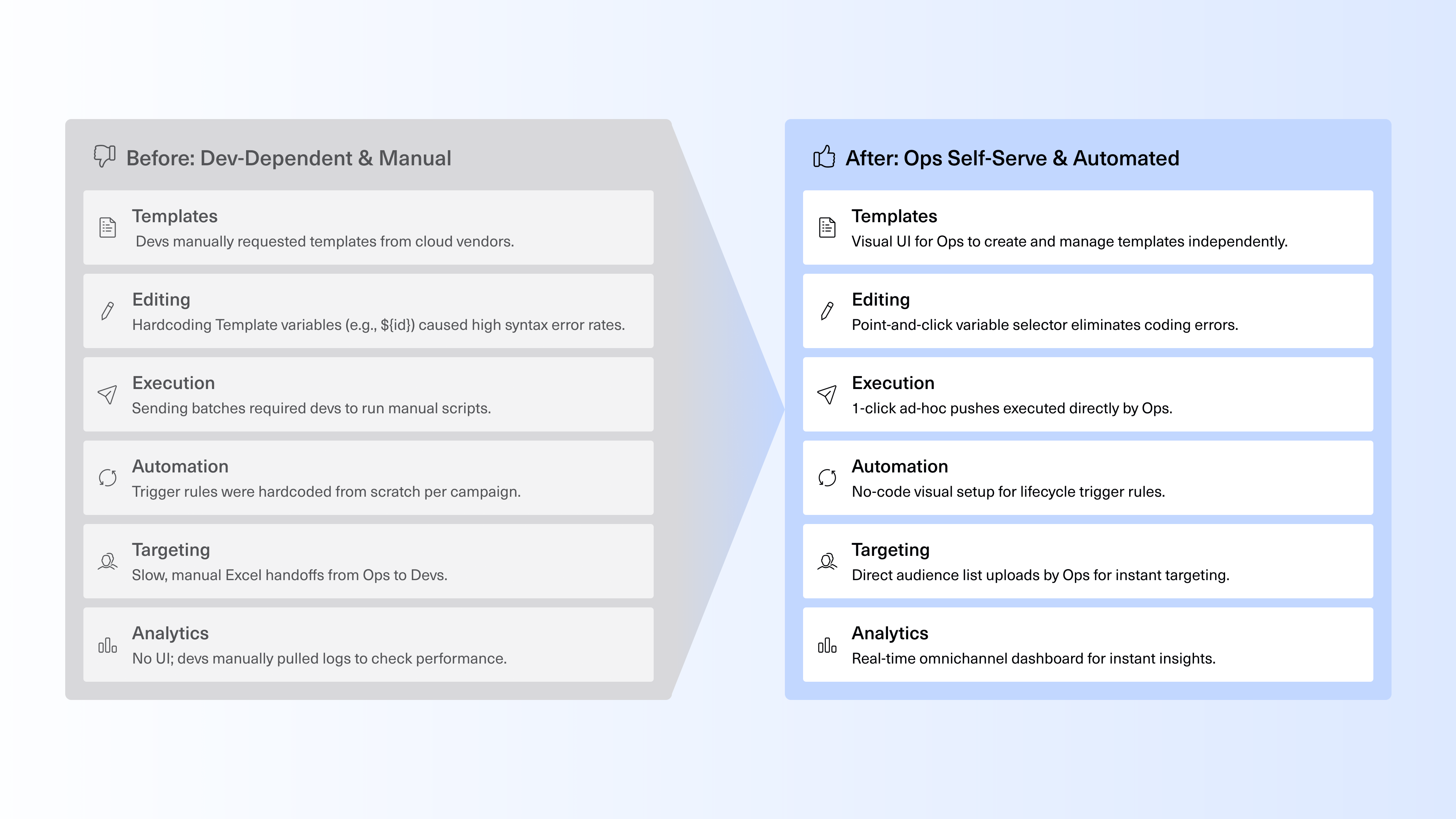
Before and After - Marketing Messages Push Workflow
Problem Statement
“Porsche’s marketing operations couldn't send messages independently, they had to rely on developers, write code manually, and use scattered tools, creating a frustrating workflow.”
Service Blueprint
To visualize the system's complexity, I created an end-to-end Service Blueprint. It breaks down the campaign lifecycle into five core phases—from template creation to data analysis. By mapping the intersection of User Goals, Frontstage Touchpoints, and Backstage Logic, this blueprint ensures that the new self-serve experience is fully supported by a robust and logical system architecture.
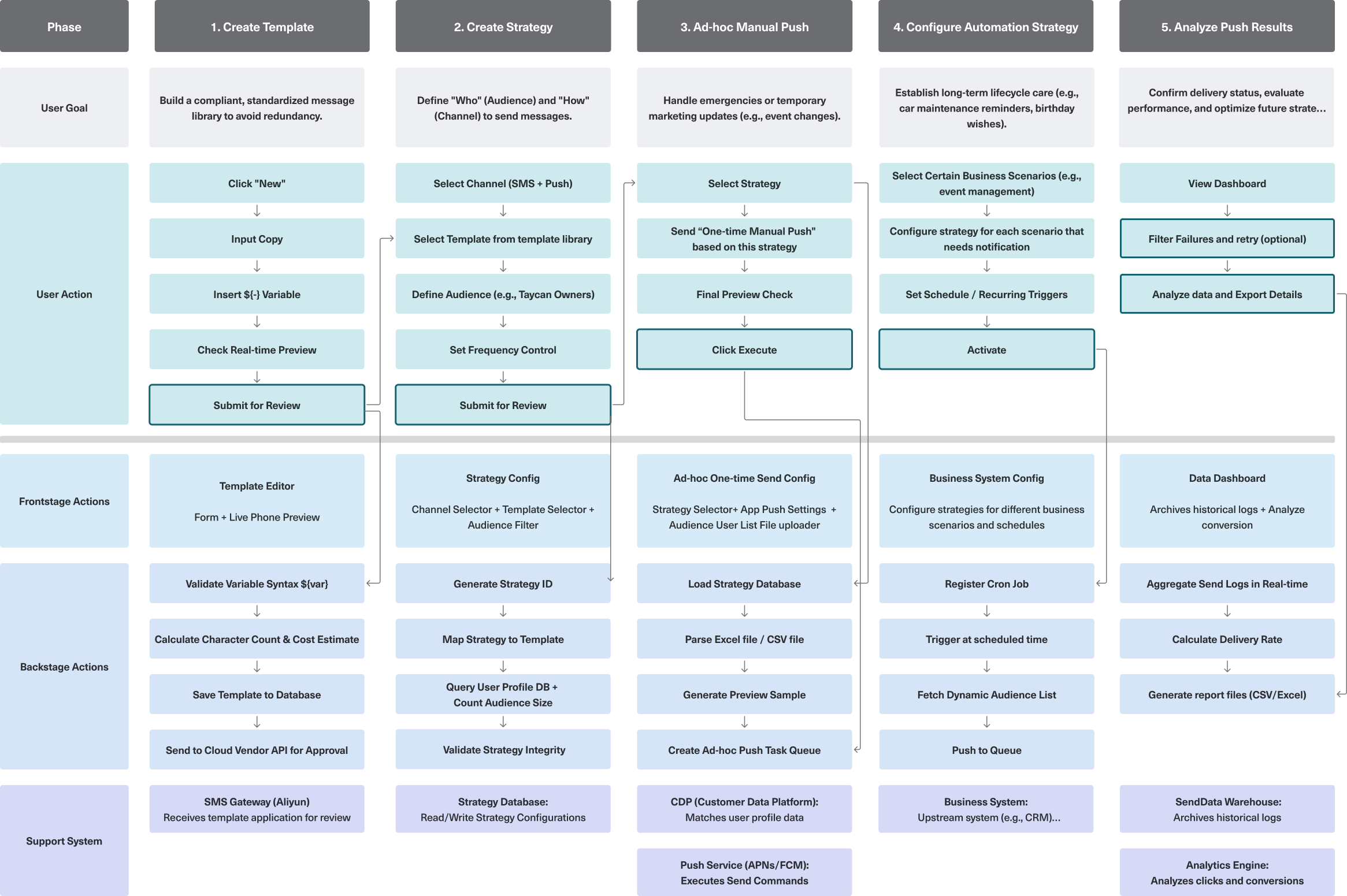

The End-to-End User Journey
To translate complex omnichannel marketing into an intuitive, self-serve experience, we structured the Notification Center around a clear, five-step operational loop: Preparation, Execution, and Analysis. This seamless journey guides operators from building the initial content to tracking the final delivery metrics, granting them full control over every digital touchpoint without writing a single line of code.
User Flow 1: Create Template
Building an error-free, standardized content library.
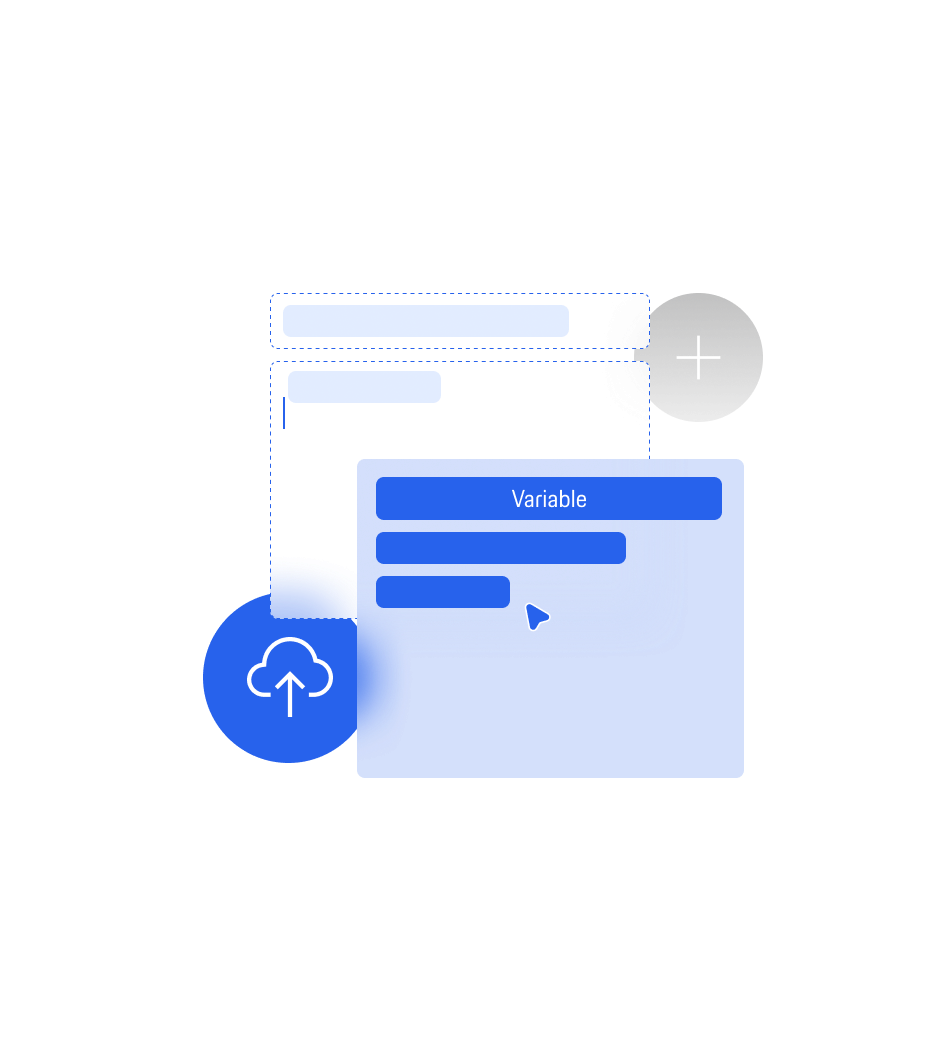
Operators start by drafting messages in a visual template editor equipped with a real-time device preview. By introducing a point-and-click variable selector (e.g., for user names or order IDs), we completely eliminated the risk of syntax errors caused by manual hardcoding, ensuring every message is brand-compliant before approval.
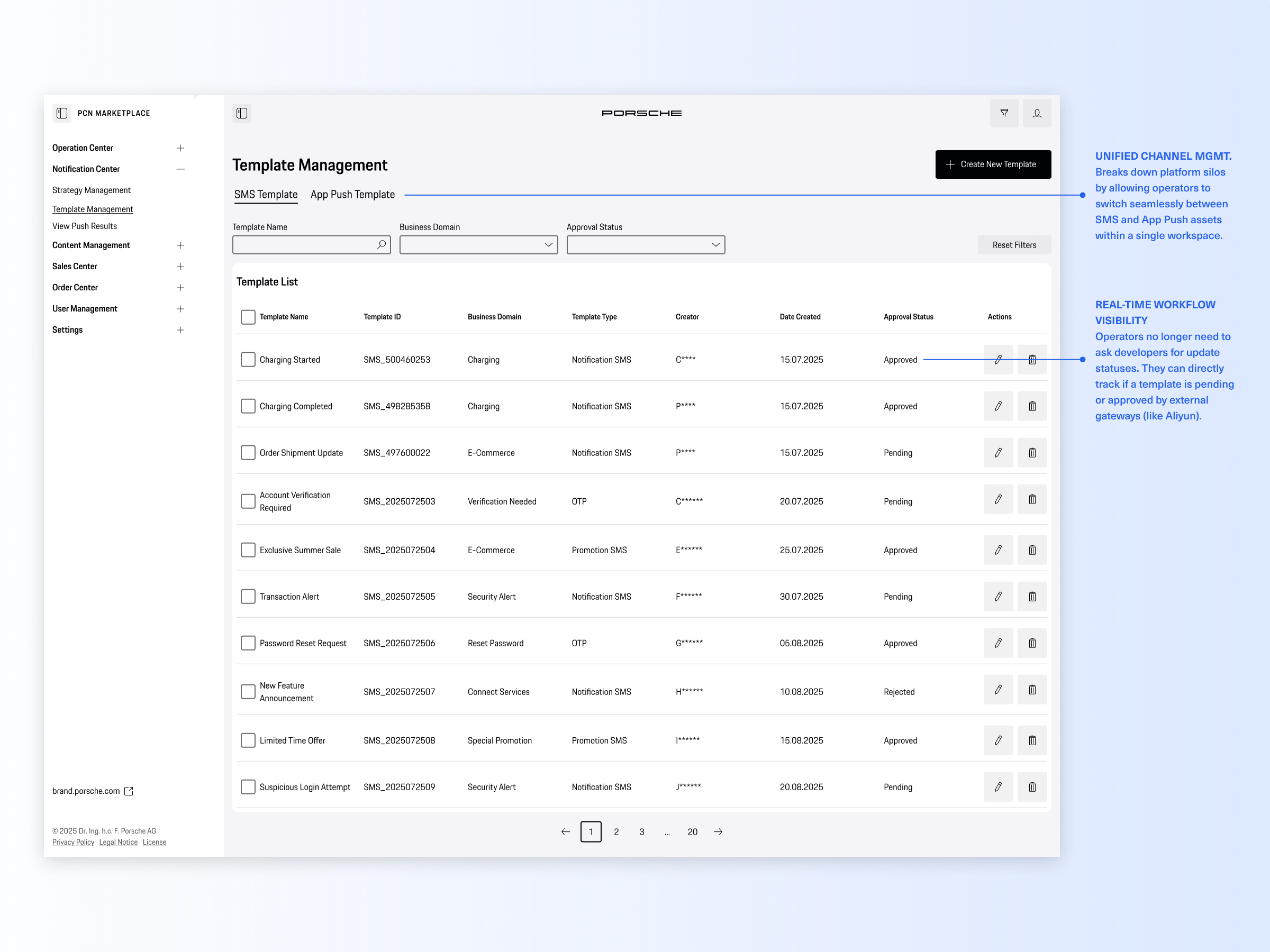
Template Management List
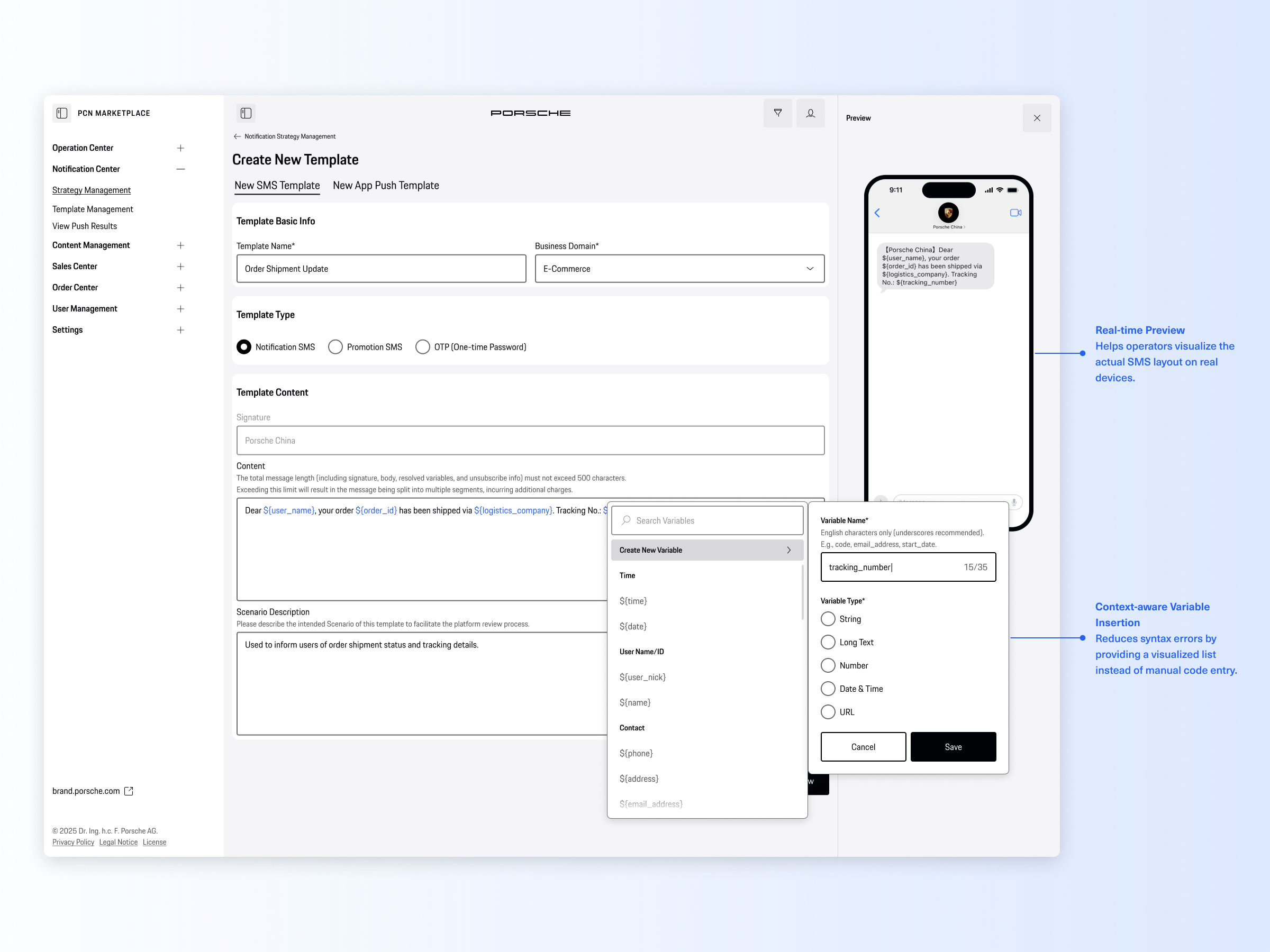
Create new SMS message / App Push Template

Defining the "Who" and "How" for reusable campaigns.
To decouple content from delivery rules, operators create distinct sending strategies. They can easily select target channels (SMS, App Push), link approved templates, and configure frequency caps to prevent user fatigue. This modular approach makes campaign rules highly reusable and easy to manage.
Notification Strategy Management List
Designing for Both Flexibility and Compliance
To translate complex omnichannel marketing into an intuitive, self-serve experience, we structured the Notification Center around a clear, five-step operational loop: Preparation, Execution, and Analysis. This seamless journey guides operators from building the initial content to tracking the final delivery metrics, granting them full control over every digital touchpoint without writing a single line of code.

User Flow 3: Ad-hoc Manual Push
1-click execution for immediate marketing needs.
For temporary updates or urgent notifications, operators can execute one-time manual pushes instantly. By uploading a target audience list and conducting a final preview check, they can trigger batch sends with a single click—completely bypassing the old, slow process of requesting developer scripts.
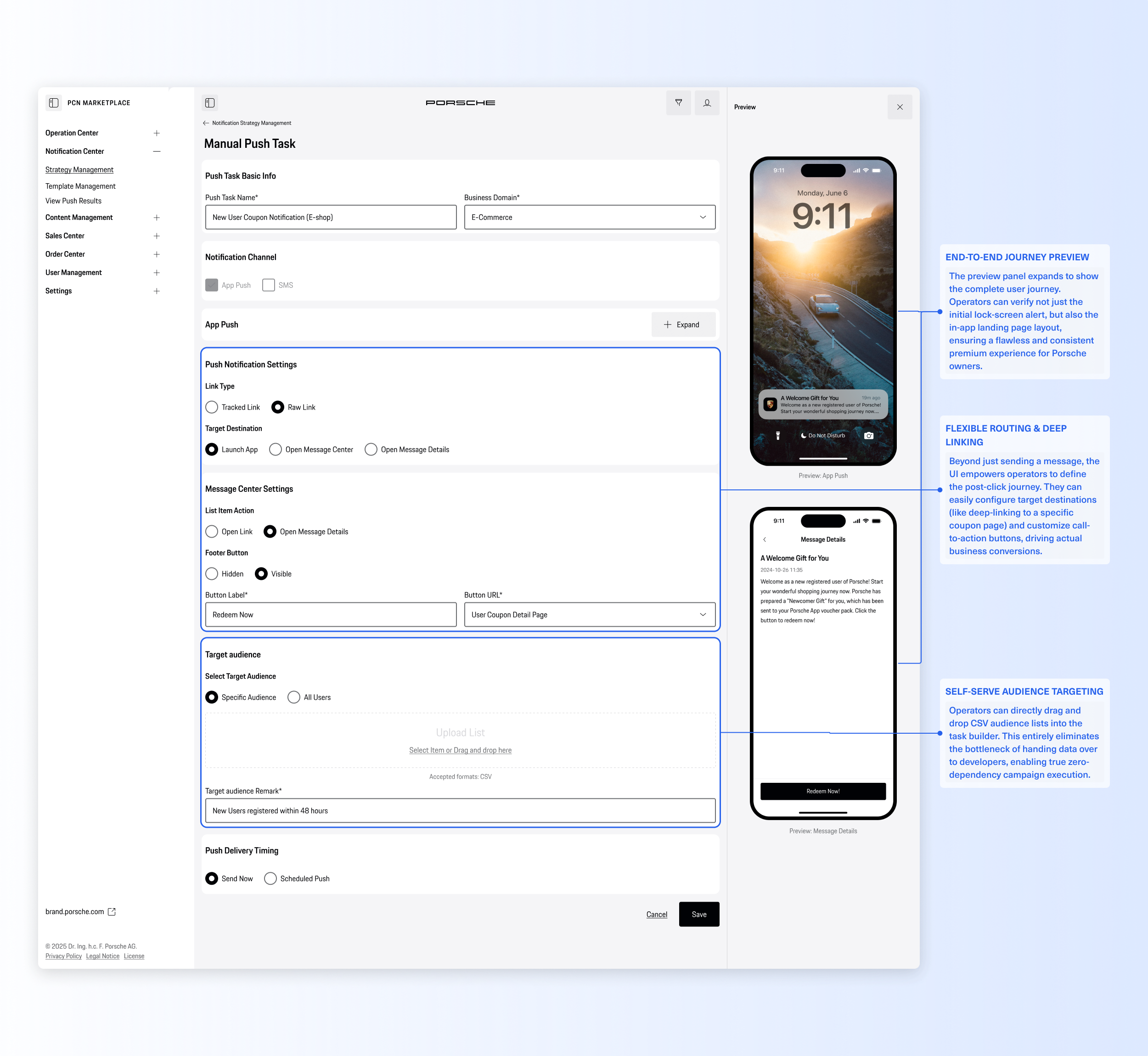
Ad Hoc (One-time Manual) Push Task Settings
User Flow 4: Configure Automation Strategy
Scaling operations with no-code lifecycle triggers.
To handle long-term customer care (like event reminders or birthday wishes), we designed a visual automation builder. Operators can easily map out trigger conditions along a timeline (Before, During, and After an event) and activate recurring schedules, transforming repetitive daily chores into a "set-it-and-forget-it" scalable engine.
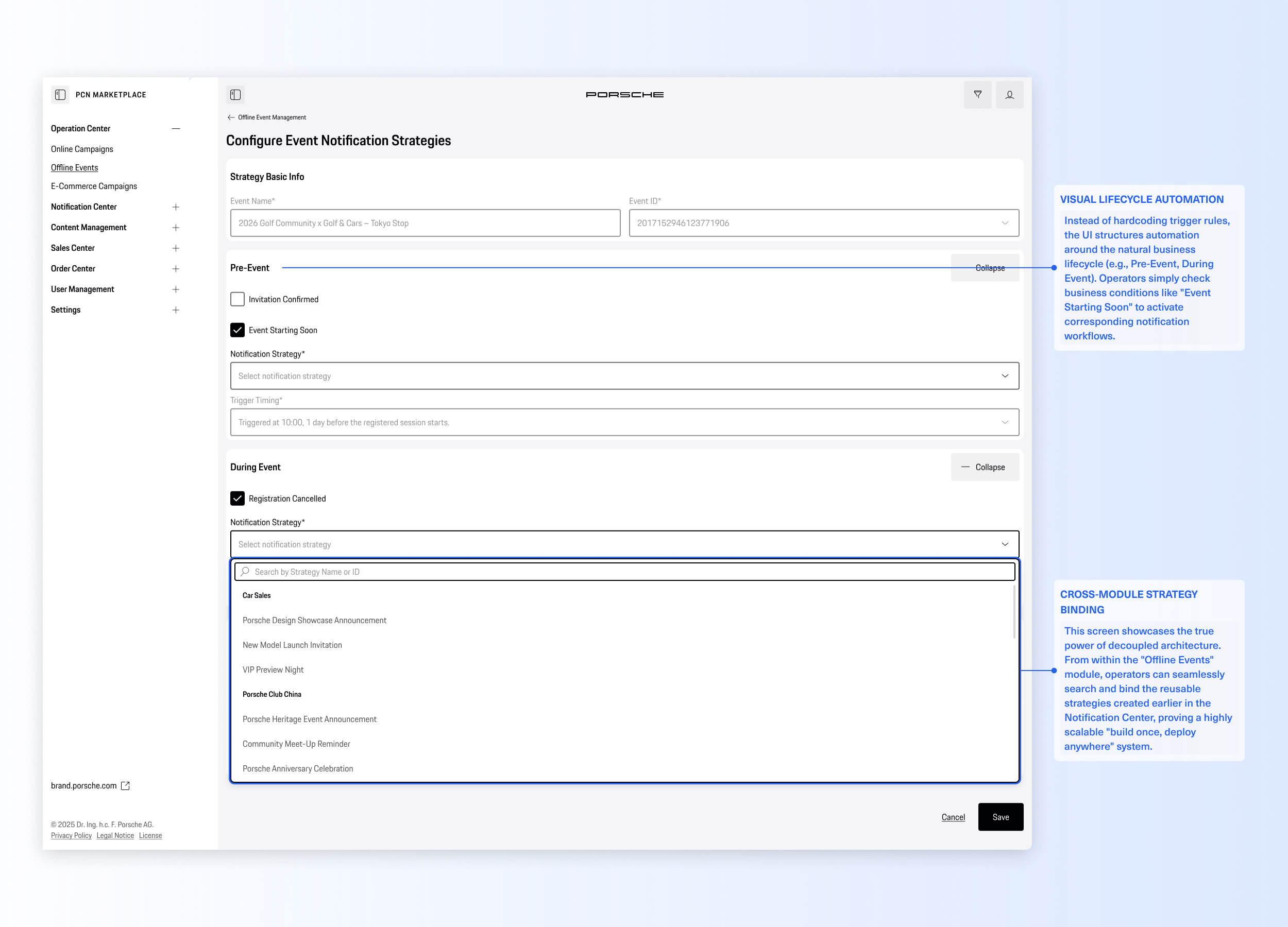
Configure Automation Strategy for Designagated
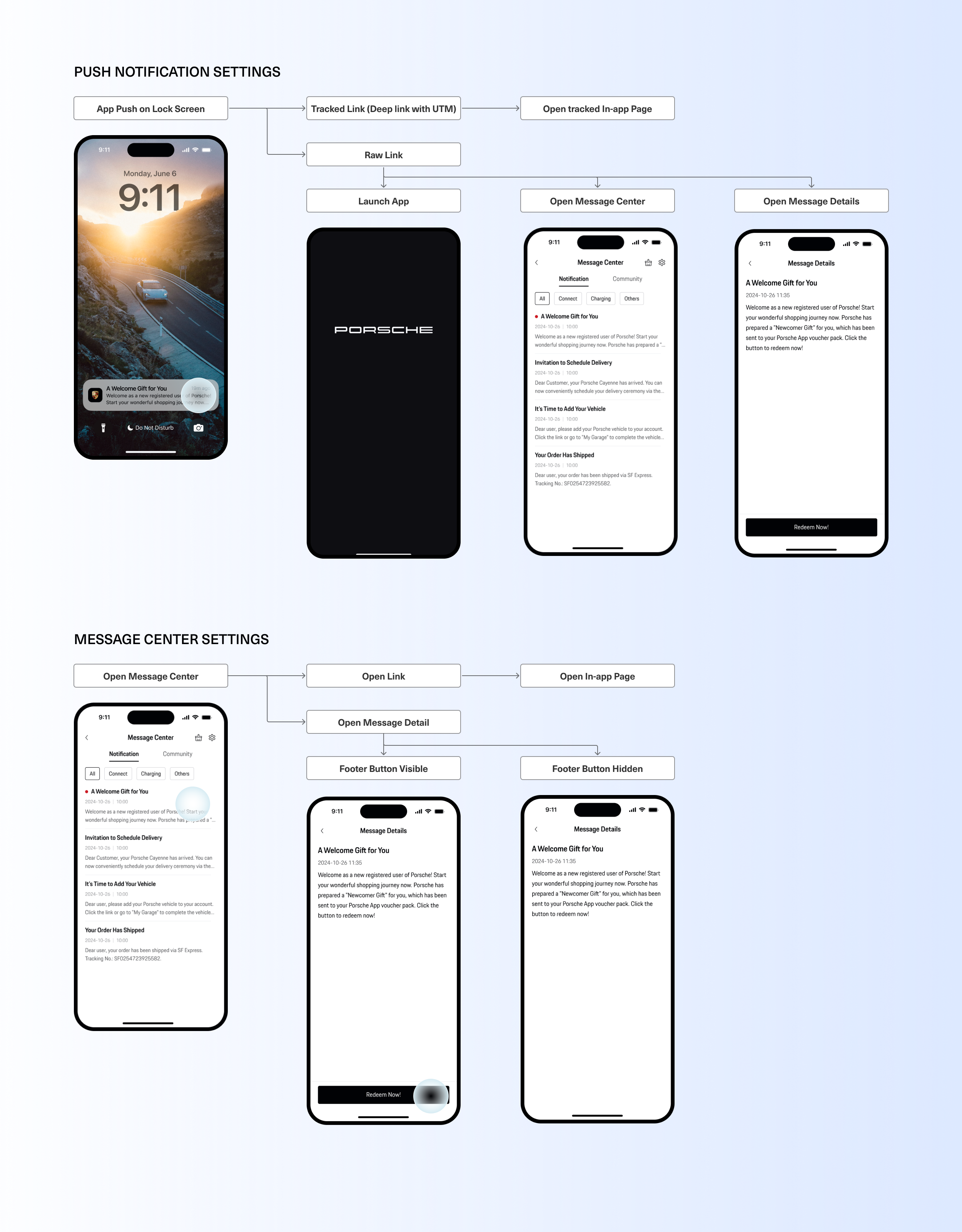
Push Notification Settings / Message Center Settings
Scaling Operations with No-Code Automation
To translate complex omnichannel marketing into an intuitive, self-serve experience, we structured the Notification Center around a clear, five-step operational loop: Preparation, Execution, and Analysis. This seamless journey guides operators from building the initial content to tracking the final delivery metrics, granting them full control over every digital touchpoint without writing a single line of code.
User Flow 5: Analyze Push Results
Closing the loop with omnichannel data insights.
Finally, operators monitor campaign performance through an aggregated dashboard. Instead of pulling isolated data logs from different tools, they get a real-time, unified view of delivery rates, success metrics, and failure reasons under a single Task ID, empowering them to optimize future strategies effortlessly.
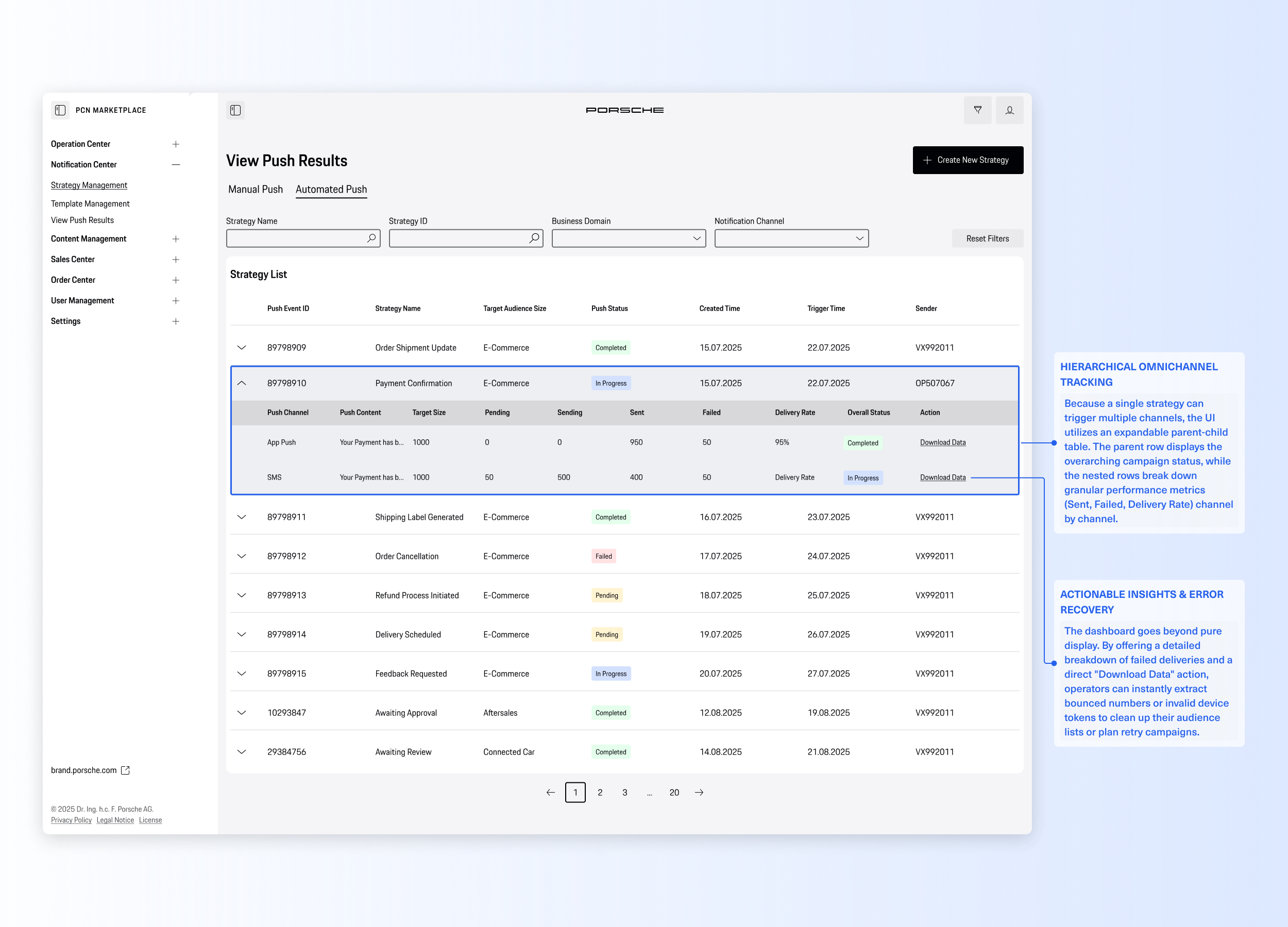
View Push Results and download data to get insights from
Conclusion & Reflection
Project Impact
100% Self-Serve Operations
Eliminated the "developer bottleneck." The marketing team can now execute and track omnichannel campaigns entirely independently.
Zero Syntax Errors
By replacing manual coding with a visual variable selector, we completely eradicated formatting and variable injection errors.
Drastically Reduced Setup Time
Reusable strategies and visual automation rules turned a multi-day, multi-tool processes into a streamlined, multi-minute task.
Design Reflections
Systems Over Pages
I learned that designing for B2B SaaS isn't just about creating clean interfaces; it's about untangling complex data structures and translating them into intuitive, unified workflows.
Balancing Freedom and Guardrails
Designing the "Public vs. Private" template logic taught me how to strike the perfect balance: giving operators creative flexibility where needed, while strictly locking down compliance risks.


Next Case
Volkswagen ADAS Cockpit Concept
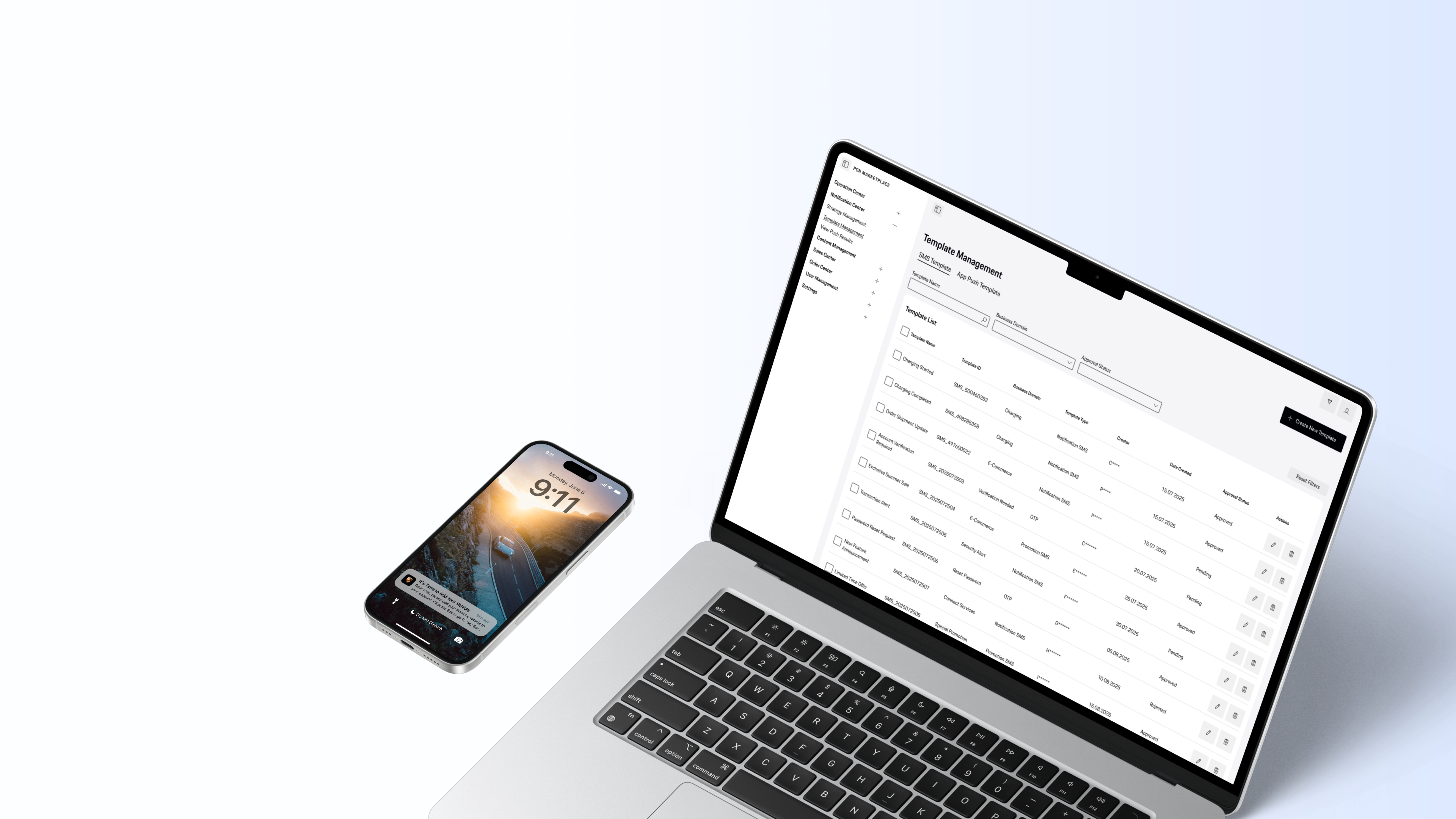
Porsche Internal Operation Console for App Push and SMS Message
Porsche Notification Center

Project Type
ToB Platform,
Internal Tool
Timeline
June 2024 –
December 2025
My Role
Product Designer
Tools
Figma
The Porsche Notification Center is a centralized B2B operation console designed for Porsche China. It transforms a highly fragmented, developer-dependent notification process into a streamlined, no-code omni-channel hub. By introducing a visual template editor and automated lifecycle strategies, the platform empowers the operations team to independently launch, manage, and track campaigns across SMS, App Push, and the WeChat ecosystem with zero coding errors.
Project Context & Our Solution
The Challenge
Before, sending messages to Porsche users was a frustrating and slow process. Operators had to jump between disconnected tools just to manage different channels like SMS and App Pushes. To send a simple event reminder, they had to move data by hand, type code to insert variables (like a user's name), and repeat the same steps over and over. Without a single, unified dashboard, the team couldn't even tell how well their messages were actually performing.
The Solution
To fix this, we designed an all-in-one Notification Center. Our goal was to turn an error-prone chore into a smooth, effortless workflow. We introduced a visual template editor (so operators no longer need to write code), easy setups for both manual and automated messages, and a clear data dashboard. Now, the team can work much faster and with total confidence, ensuring every message they send matches Porsche's premium standard.
Before and After - Marketing Messages Push Workflow
Problem Statement
“Porsche’s marketing operations couldn't send messages independently, they had to rely on developers, write code manually, and use scattered tools, creating a frustrating workflow.”
Service Blueprint
To visualize the system's complexity, I created an end-to-end Service Blueprint. It breaks down the campaign lifecycle into five core phases—from template creation to data analysis. By mapping the intersection of User Goals, Frontstage Touchpoints, and Backstage Logic, this blueprint ensures that the new self-serve experience is fully supported by a robust and logical system architecture.

The End-to-End User Journey
To translate complex omnichannel marketing into an intuitive, self-serve experience, we structured the Notification Center around a clear, five-step operational loop: Preparation, Execution, and Analysis. This seamless journey guides operators from building the initial content to tracking the final delivery metrics, granting them full control over every digital touchpoint without writing a single line of code.
User Flow 1: Create Template
Building an error-free, standardized content library.
Operators start by drafting messages in a visual template editor equipped with a real-time device preview. By introducing a point-and-click variable selector (e.g., for user names or order IDs), we completely eliminated the risk of syntax errors caused by manual hardcoding, ensuring every message is brand-compliant before approval.
Template Management List
Create new SMS message / App Push Template

Defining the "Who" and "How" for reusable campaigns.
To decouple content from delivery rules, operators create distinct sending strategies. They can easily select target channels (SMS, App Push), link approved templates, and configure frequency caps to prevent user fatigue. This modular approach makes campaign rules highly reusable and easy to manage.
Notification Strategy Management List
Designing for Both Flexibility and Compliance
To translate complex omnichannel marketing into an intuitive, self-serve experience, we structured the Notification Center around a clear, five-step operational loop: Preparation, Execution, and Analysis. This seamless journey guides operators from building the initial content to tracking the final delivery metrics, granting them full control over every digital touchpoint without writing a single line of code.
User Flow 3: Ad-hoc Manual Push
1-click execution for immediate marketing needs.
For temporary updates or urgent notifications, operators can execute one-time manual pushes instantly. By uploading a target audience list and conducting a final preview check, they can trigger batch sends with a single click—completely bypassing the old, slow process of requesting developer scripts.
Ad Hoc (One-time Manual) Push Task Settings
User Flow 4: Configure Automation Strategy
Scaling operations with no-code lifecycle triggers.
To handle long-term customer care (like event reminders or birthday wishes), we designed a visual automation builder. Operators can easily map out trigger conditions along a timeline (Before, During, and After an event) and activate recurring schedules, transforming repetitive daily chores into a "set-it-and-forget-it" scalable engine.
Configure Automation Strategy for Designagated
Push Notification Settings / Message Center Settings
User Flow 5: Analyze Push Results
Closing the loop with omnichannel data insights.
Finally, operators monitor campaign performance through an aggregated dashboard. Instead of pulling isolated data logs from different tools, they get a real-time, unified view of delivery rates, success metrics, and failure reasons under a single Task ID, empowering them to optimize future strategies effortlessly.
View Push Results and download data to get insights from
Scaling Operations with No-Code Automation
To translate complex omnichannel marketing into an intuitive, self-serve experience, we structured the Notification Center around a clear, five-step operational loop: Preparation, Execution, and Analysis. This seamless journey guides operators from building the initial content to tracking the final delivery metrics, granting them full control over every digital touchpoint without writing a single line of code.
Conclusion & Reflection
Project Impact
100% Self-Serve Operations
Eliminated the "developer bottleneck." The marketing team can now execute and track omnichannel campaigns entirely independently.
Zero Syntax Errors
By replacing manual coding with a visual variable selector, we completely eradicated formatting and variable injection errors.
Drastically Reduced Setup Time
Reusable strategies and visual automation rules turned a multi-day, multi-tool processes into a streamlined, multi-minute task.
Design Reflections
Systems Over Pages
I learned that designing for B2B SaaS isn't just about creating clean interfaces; it's about untangling complex data structures and translating them into intuitive, unified workflows.
Balancing Freedom and Guardrails
Designing the "Public vs. Private" template logic taught me how to strike the perfect balance: giving operators creative flexibility where needed, while strictly locking down compliance risks.

Porsche Internal Operation Console for App Push and SMS Message
Porsche Notification Center

Project Type
ToB Platform, Internal Tool
Timeline
June 2024 – December 2025
My Role
Product Designer
Tools
Figma
The Porsche Notification Center is a centralized B2B operation console designed for Porsche China. It transforms a highly fragmented, developer-dependent notification process into a streamlined, no-code omni-channel hub. By introducing a visual template editor and automated lifecycle strategies, the platform empowers the operations team to independently launch, manage, and track campaigns across SMS, App Push, and the WeChat ecosystem with zero coding errors.
Project Context & Our Solution
The Challenge
Before, sending messages to Porsche users was a frustrating and slow process. Operators had to jump between disconnected tools just to manage different channels like SMS and App Pushes. To send a simple event reminder, they had to move data by hand, type code to insert variables (like a user's name), and repeat the same steps over and over. Without a single, unified dashboard, the team couldn't even tell how well their messages were actually performing.
The Solution
To fix this, we designed an all-in-one Notification Center. Our goal was to turn an error-prone chore into a smooth, effortless workflow. We introduced a visual template editor (so operators no longer need to write code), easy setups for both manual and automated messages, and a clear data dashboard. Now, the team can work much faster and with total confidence, ensuring every message they send matches Porsche's premium standard.
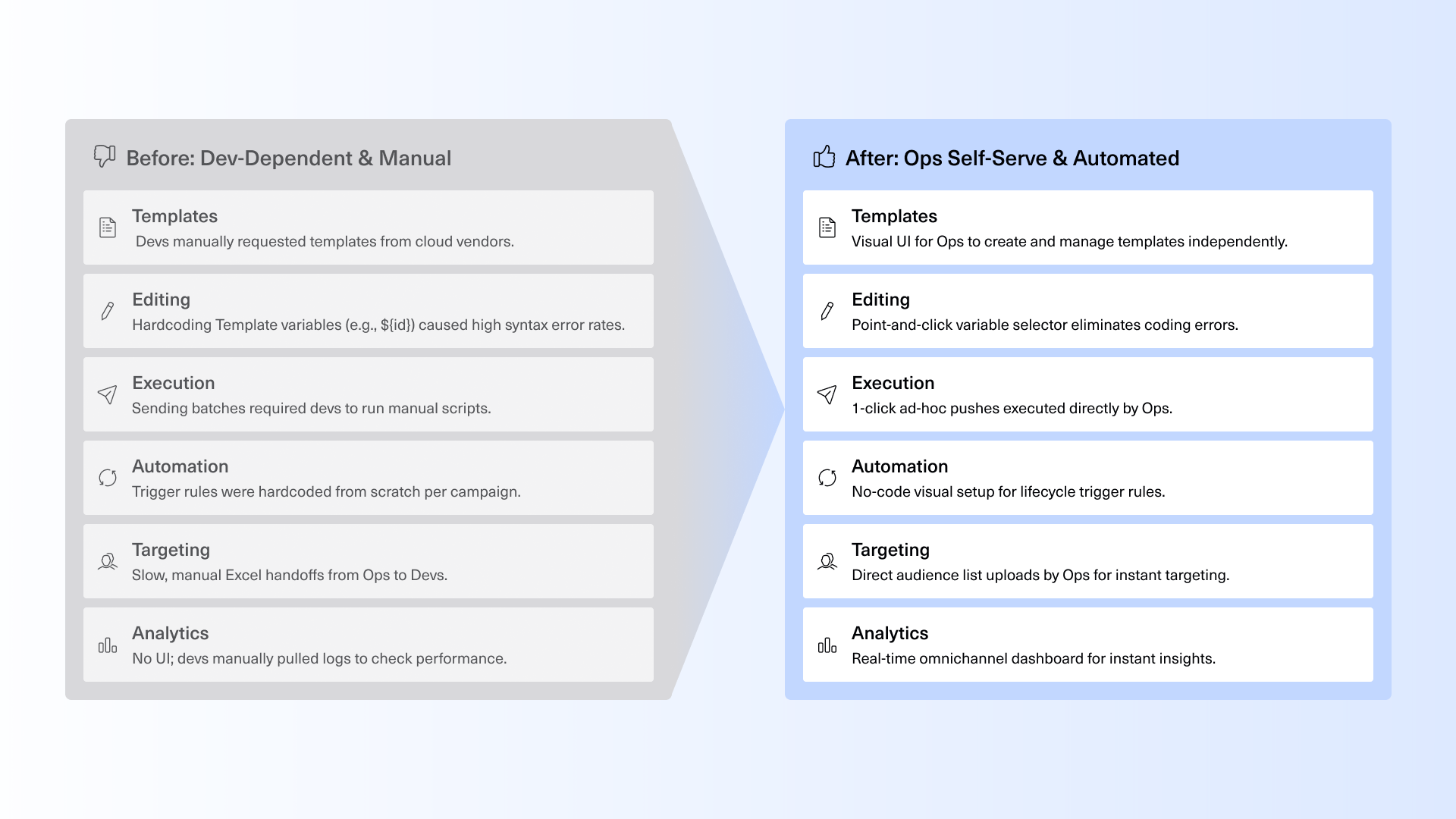
Before and After - Marketing Messages Push Workflow
Problem Statement
“Porsche’s marketing operations couldn't send messages independently, they had to rely on developers, write code manually, and use scattered tools, creating a frustrating workflow.”
Service Blueprint
To visualize the system's complexity, I created an end-to-end Service Blueprint. It breaks down the campaign lifecycle into five core phases—from template creation to data analysis. By mapping the intersection of User Goals, Frontstage Touchpoints, and Backstage Logic, this blueprint ensures that the new self-serve experience is fully supported by a robust and logical system architecture.

The End-to-End User Journey
To translate complex omnichannel marketing into an intuitive, self-serve experience, we structured the Notification Center around a clear, five-step operational loop: Preparation, Execution, and Analysis. This seamless journey guides operators from building the initial content to tracking the final delivery metrics, granting them full control over every digital touchpoint without writing a single line of code.
User Flow 1: Create Template
Building an error-free, standardized content library.
Operators start by drafting messages in a visual template editor equipped with a real-time device preview. By introducing a point-and-click variable selector (e.g., for user names or order IDs), we completely eliminated the risk of syntax errors caused by manual hardcoding, ensuring every message is brand-compliant before approval.
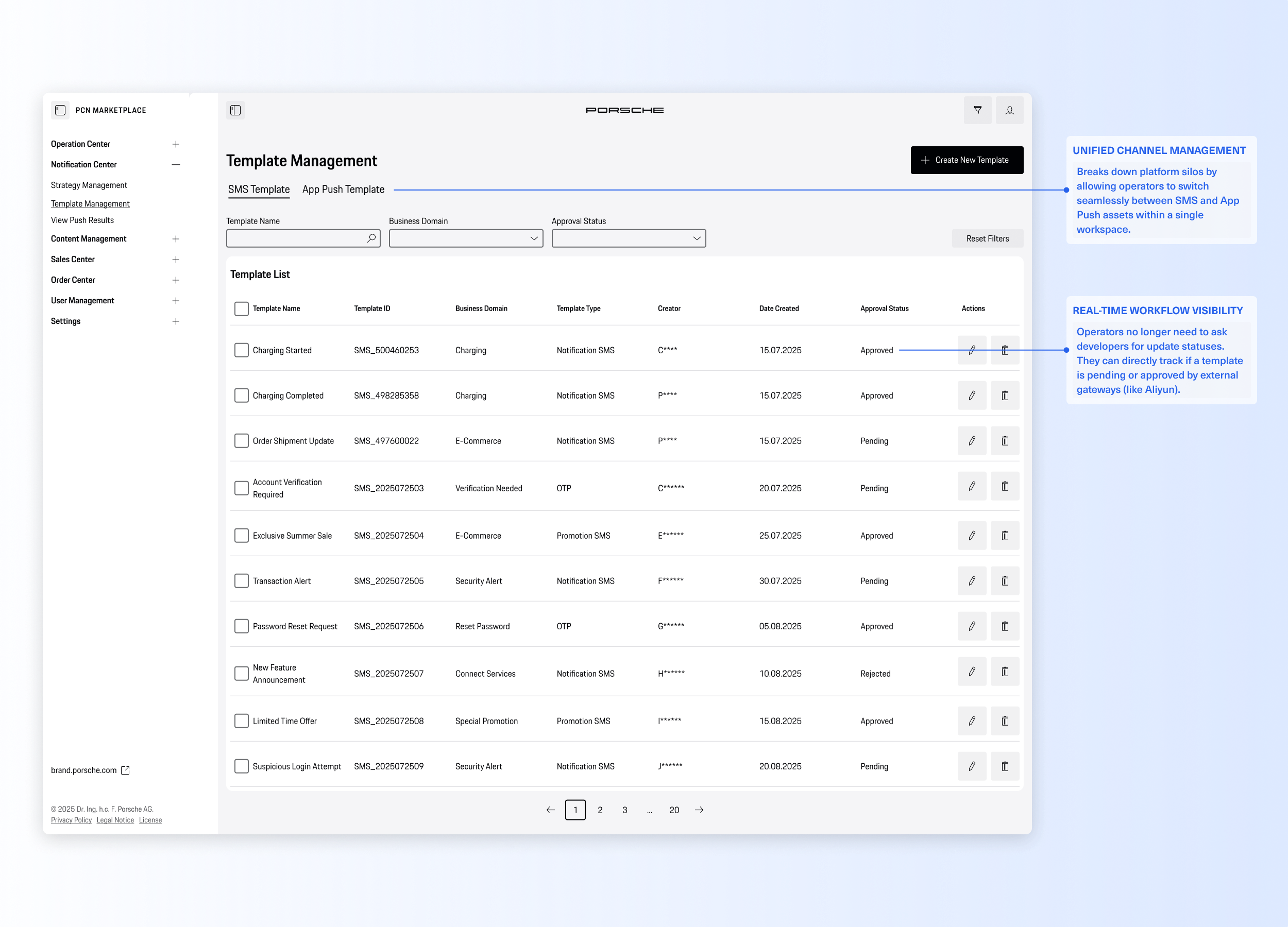
Template Management List
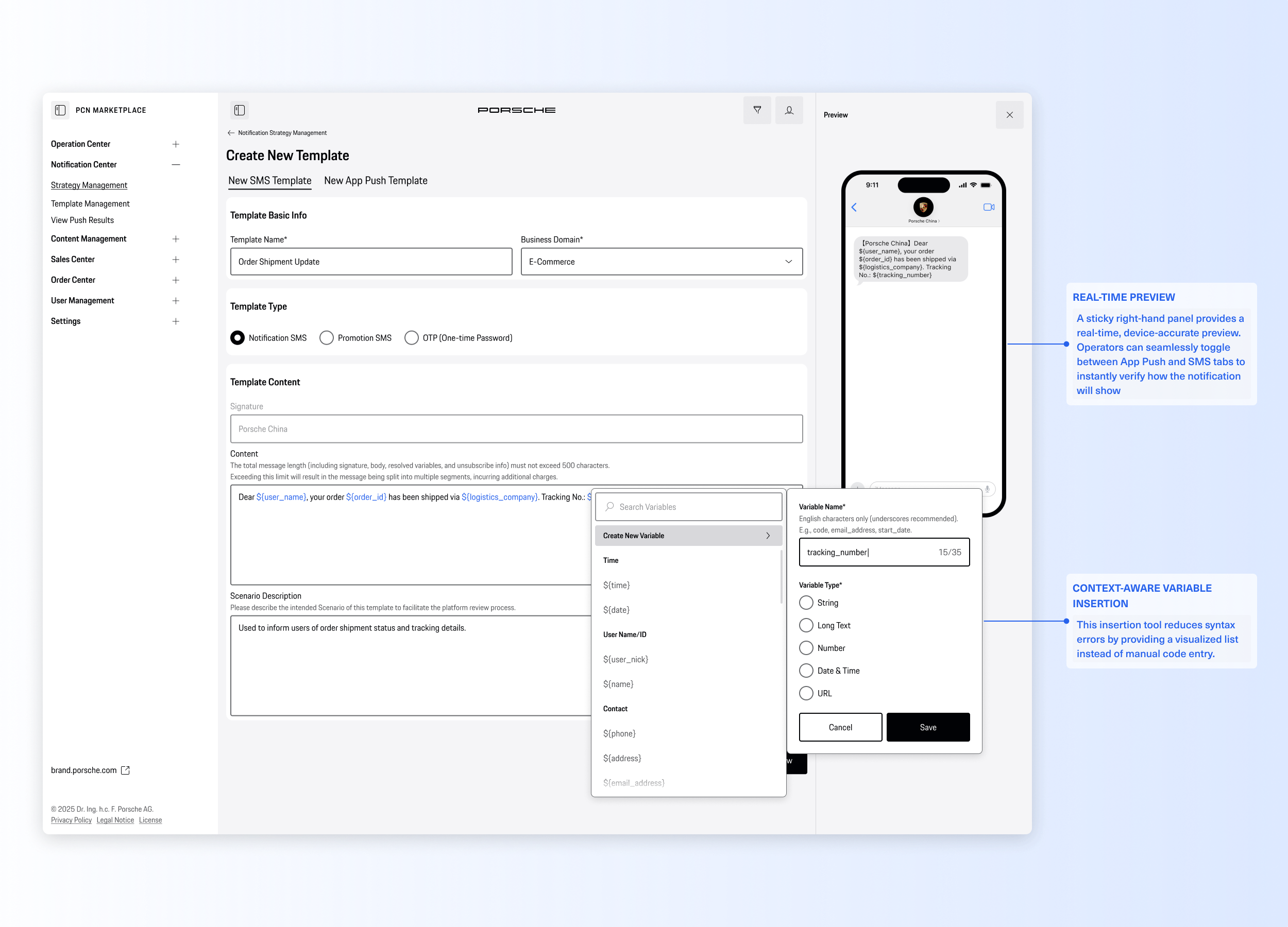
Create new SMS message / App Push Template

User Flow 2: Create Strategies
To decouple content from delivery rules, operators create distinct sending strategies. They can easily select target channels (SMS, App Push), link approved templates, and configure frequency caps to prevent user fatigue. This modular approach makes campaign rules highly reusable and easy to manage.
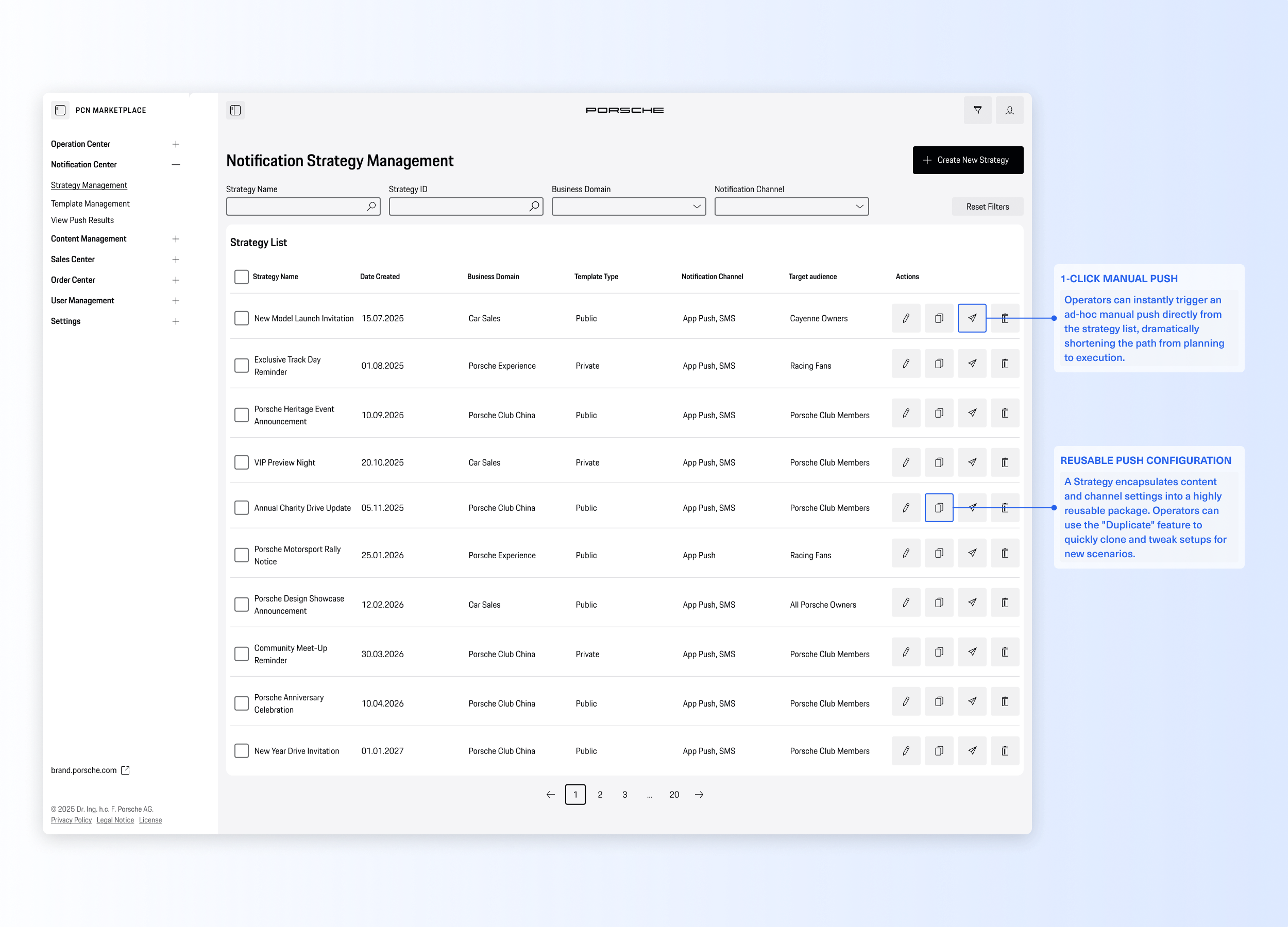
Notification Strategy Management List
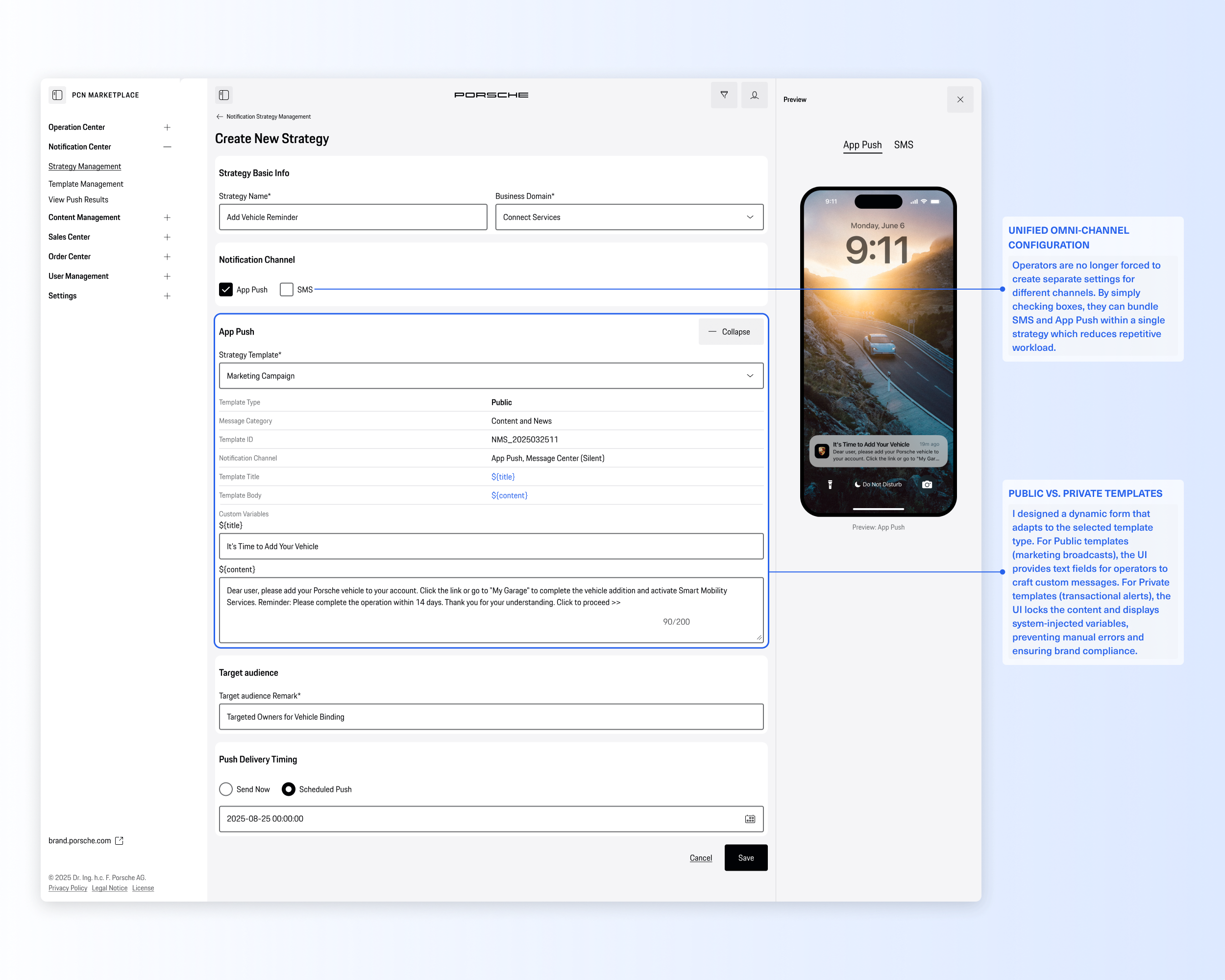
Create new Strategy - App push
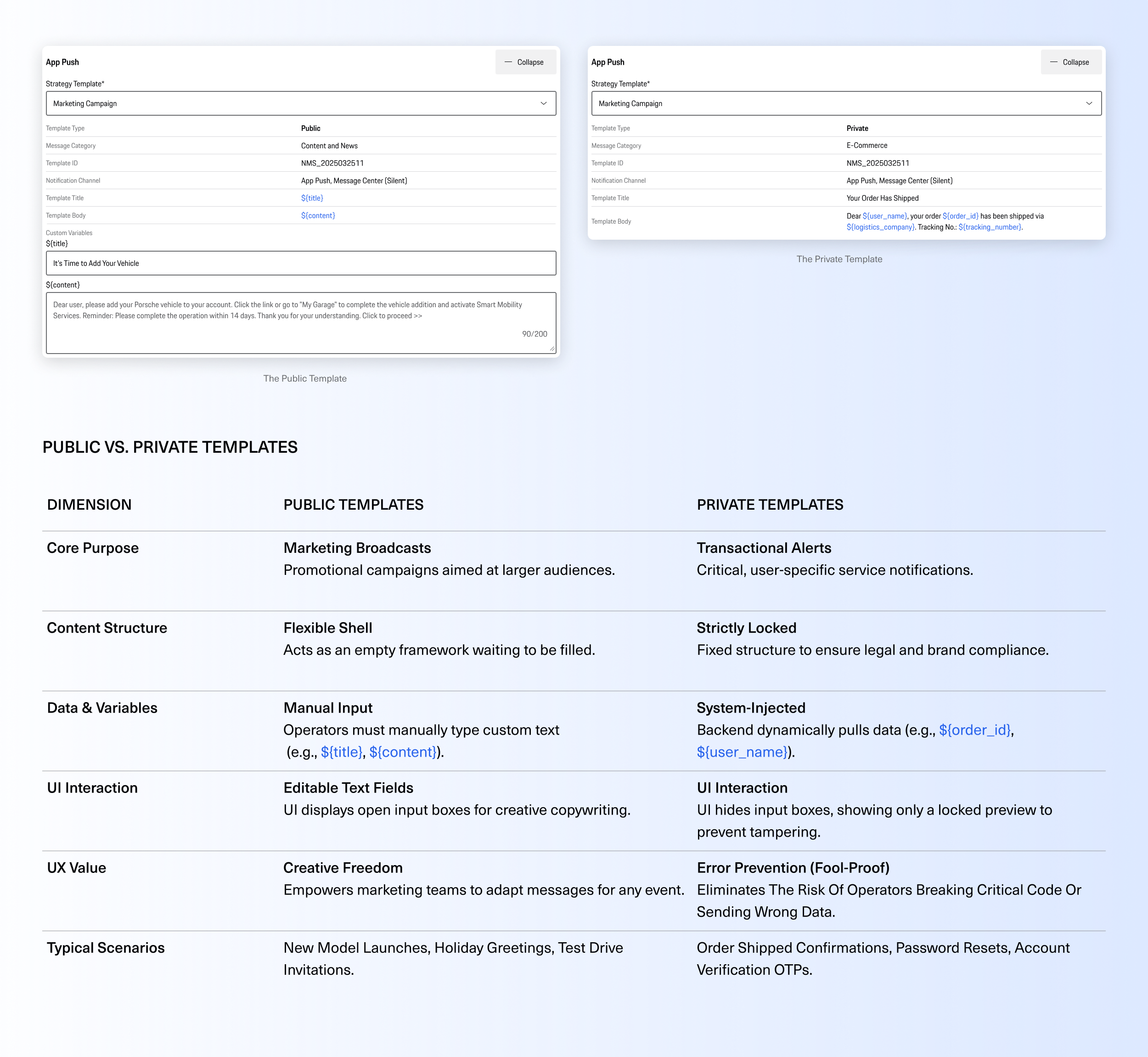
Public Vs. Private Templates
Designing for Both Flexibility and Compliance
The system intelligently adapts its UI based on the template's business nature. For Public Templates (Marketing), we provide editable text fields to maximize creative flexibility. However, for Private Templates (Transactional), the UI strictly locks the content into a read-only state. This prevents operators from accidentally modifying compliance-approved alerts and eliminates manual data entry, relying entirely on secure backend variable injection.
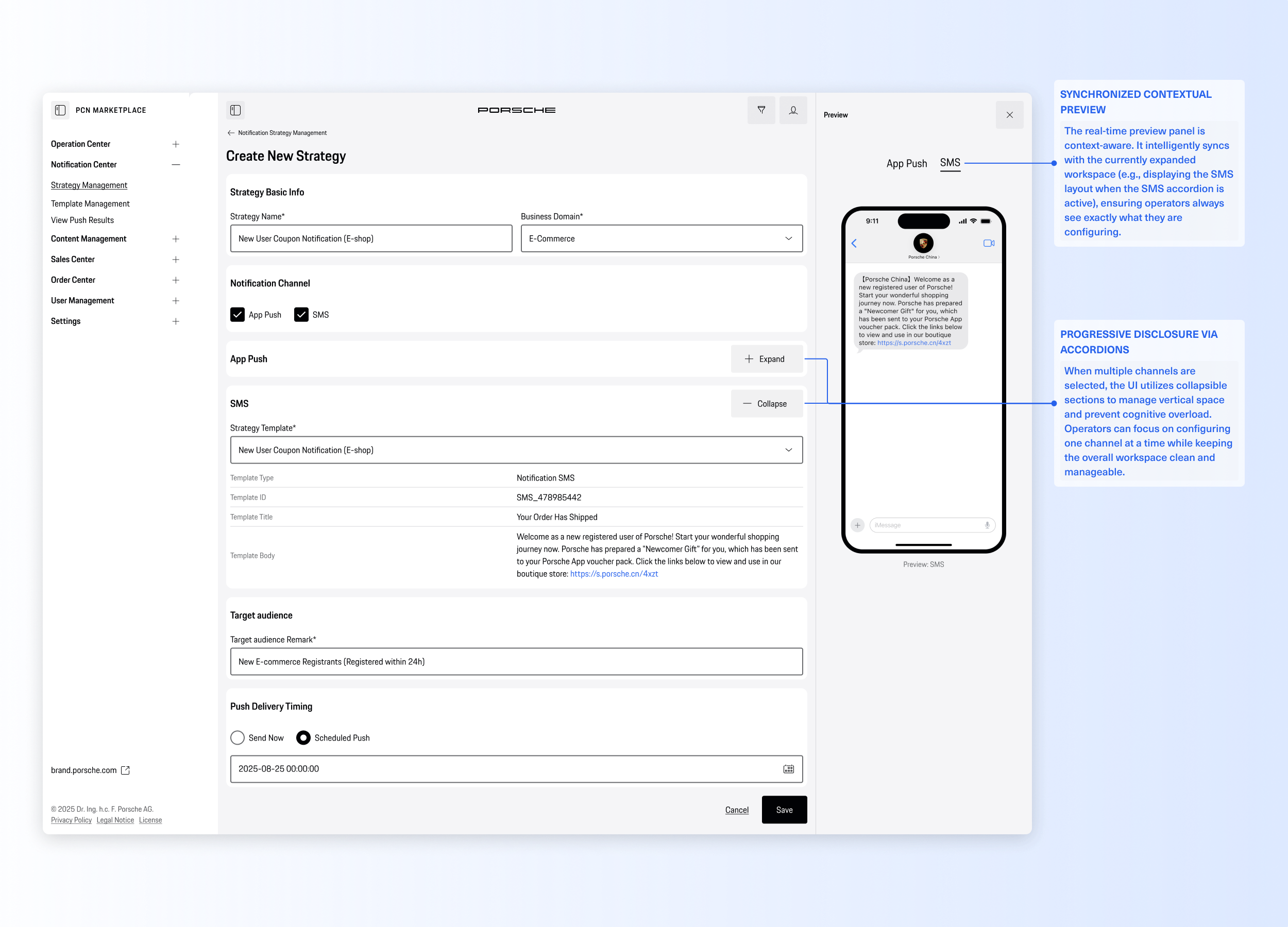
Create new Strategy - SMS

User Flow 3: Ad-hoc Manual Push
1-click execution for immediate marketing needs.
For temporary updates or urgent notifications, operators can execute one-time manual pushes instantly. By uploading a target audience list and conducting a final preview check, they can trigger batch sends with a single click—completely bypassing the old, slow process of requesting developer scripts.
Ad Hoc (One-time Manual) Push Task Settings
Push Notification Settings / Message Center Settings
User Flow 4: Configure Automation Strategy
Scaling operations with no-code lifecycle triggers.
To handle long-term customer care (like event reminders or birthday wishes), we designed a visual automation builder. Operators can easily map out trigger conditions along a timeline (Before, During, and After an event) and activate recurring schedules, transforming repetitive daily chores into a "set-it-and-forget-it" scalable engine.
Configure Automation Strategy for Designated Business Scenarios
Scaling Operations with No-Code Automation
While manual pushes are great for ad-hoc needs, the real efficiency comes from automation. By embedding the Notification Center's capabilities into specific business domains (like Offline Events), we empower operators to map reusable strategies to system triggers—transforming repetitive tasks into an automated, "set-it-and-forget-it" engine.
User Flow 5: Analyze Push Results
Closing the loop with omnichannel data insights.
Finally, operators monitor campaign performance through an aggregated dashboard. Instead of pulling isolated data logs from different tools, they get a real-time, unified view of delivery rates, success metrics, and failure reasons under a single Task ID, empowering them to optimize future strategies effortlessly.
View Push Results and download data to get insights from
Conclusion & Reflection
Project Impact
100% Self-Serve Operations
Eliminated the "developer bottleneck." The marketing team can now execute and track omnichannel campaigns entirely independently.
Zero Syntax Errors
By replacing manual coding with a visual variable selector, we completely eradicated formatting and variable injection errors.
Drastically Reduced Setup Time
Reusable strategies and visual automation rules turned a multi-day, multi-tool processes into a streamlined, multi-minute task.
Design Reflections
Systems Over Pages
I learned that designing for B2B SaaS isn't just about creating clean interfaces; it's about untangling complex data structures and translating them into intuitive, unified workflows.
Balancing Freedom and Guardrails
Designing the "Public vs. Private" template logic taught me how to strike the perfect balance: giving operators creative flexibility where needed, while strictly locking down compliance risks.
